

Factory
: How to use it, features, and the business problems it solves
What is Factory?
Factory is an AI agent for software development, "Droid," from The San Francisco AI Factory, Inc. (USA). It reads your repository, makes a plan, changes files, validates with tests, and carries the work through to a pull request. It runs in a desktop app, CLI, web, mobile, SDK, and VS Code/JetBrains/Zed, and lets you switch between Claude, GPT, Gemini, Grok, and open models. Pricing: Free $0 (bring your own inference) / Pro $20 / Plus $100 / Max $200 (per person per month) / Teams $60 + $40 per person; Business and Enterprise with SSO, ZDR, and on-premise deployment are by inquiry (as of November 2026).
Business problems it solves

About "Factory"
What is Factory?
Factory is a service that provides "Droid," an AI agent for software development. It is operated by The San Francisco AI Factory, Inc., a Delaware corporation based in San Francisco. Droid reads your repository, makes a plan, changes files, runs tests and other validation, and carries the work through to a pull request.
The official site describes it as "AI Coding Agents for the Enterprise" that are "Model agnostic. Deployed anywhere." You can switch between Claude, GPT, Gemini, and Grok as well as open models such as GLM, Kimi, and DeepSeek from the same interface, and bring your own API keys or endpoints.
- The same Droid everywhere — runs in the desktop app (macOS, Windows, Linux), CLI, web, mobile, and SDK, with sessions that sync across devices
- Proposes before it changes — the basic loop is to show a diff and wait for approval before editing; the autonomy level is configurable
- Development work beyond coding — pull request review, incident triage, writing specs, and automating repetitive work (Automations)
- Admin features built for enterprise rollout — SSO, SAML/SCIM, Zero Data Retention (ZDR), audit logs, and on-premise deployment (Enterprise)
Factory announced general availability on May 28, 2025. Individuals can start on the free Free plan (bring your own inference), and Pro, where Factory provides the inference, starts at $20/month. The official site has Japanese versions of the top page, pricing page, and desktop app page, while the documentation is in English.
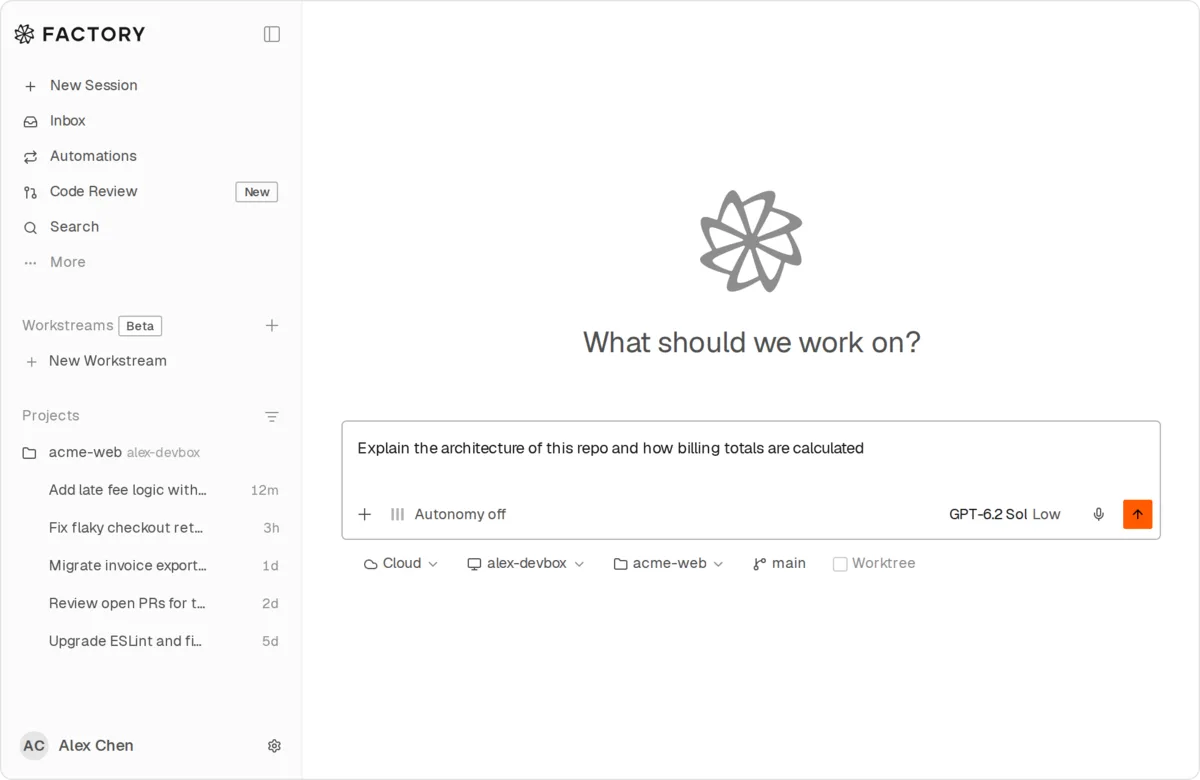
Source: Factory docs, "Factory App Quickstart" (the images below are also from Factory's official documentation)
How to use it
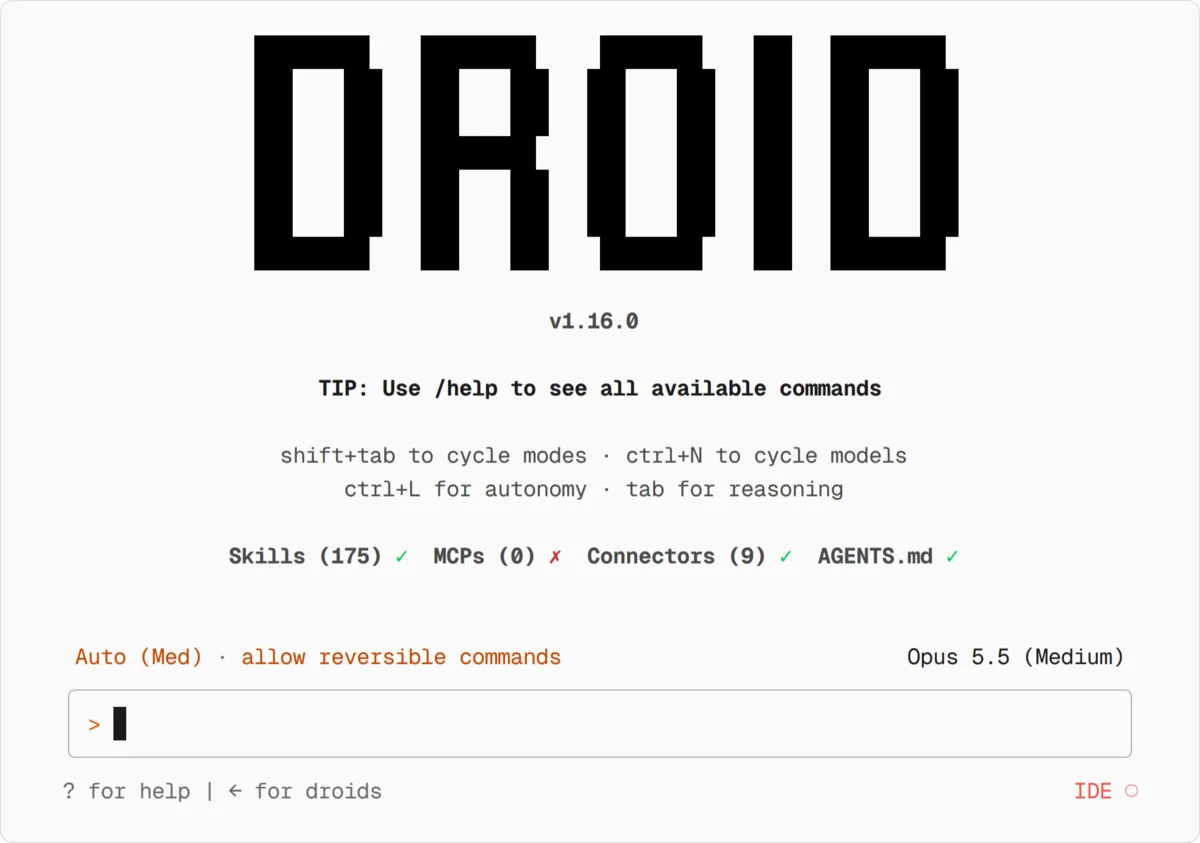
This walks through getting started with the CLI (Droid CLI), following the official quickstart. In the desktop app (Factory App), you choose a working folder and a model and then make requests the same way.
- Install it
On macOS and Linux run
curl -fsSL https://app.factory.ai/cli | sh; with Homebrew,brew install --cask droid; on Windows,irm https://app.factory.ai/cli/windows | iexin PowerShell; or with npm,npm install -g droid. Linux needsxdg-utils. - Start it in your project folder
Move to your project folder in the terminal and type
droid. Sign in through your browser if prompted. - Have it explain the codebase first Ask something like "analyze this codebase and explain the overall architecture," and Droid reads the files it needs and summarizes the architecture, entry points, test commands, and code conventions.
- Ask for a small change and review the diff When you request a change, Droid inspects the current implementation, proposes a plan when needed, shows the exact diff, and waits for approval before editing. Review the diff and the relevant tests before accepting.
- Expand to bigger work and automation
Use Specification Mode (have it write a plan first) for multi-step features,
/reviewfor reviews, Droid Exec for scripts and CI, and Missions for large work that needs planning, delegation, and validation.
Features
- Hand off plan → change → validate → pull request Droid builds features from a ticket, spec, or prompt and validates changes by running tests. You can also ask for Git operations conversationally, including commit messages that follow your team's conventions.
- Pull request review
It returns a review with inline comments on every pull request (Code Review). In the CLI,
/reviewreviews uncommitted changes, commits, and branch diffs. - Works from the editor you already use
In VS Code, Cursor, and Windsurf, the extension passes your open files, selection, and editor diagnostics to Droid. In JetBrains IDEs it runs inside AI Chat, and in Zed in the Agent Panel. In other editors you can start
droidfrom the integrated terminal. - Connects to your team's tools Connect Slack, GitHub, Linear, Sentry, Notion, Confluence, and more, and Droid reads the context you approve. MCP servers, skills, hooks, and plugins support custom setups.
- Review and refine in the desktop app In the Factory App, documents, presentations, spreadsheets, PDFs, and live websites—as well as code diffs—open in a preview beside the session. Design mode lets you select an element in the preview and say what to change, and inline code review lets you comment on any line.
- Choose models, or route them automatically Choose from Anthropic, OpenAI, Google, and xAI models plus Droid Core open models. Factory Router automatically routes each task to a model that balances quality, speed, and cost.
- Automation of routine work and management of large work Automations hand repetitive work such as triage, code review, QA, docs, and incident response to Droid. Mission Control shows worker progress and execution logs for active Missions in real time.
- Visibility for organizations Analytics shows usage per developer and team, Agent Readiness scores whether each repository is ready for agent-driven work, and AutoWiki turns a repository's architecture into living documentation.
Pricing
Prices are as shown on the official pricing page, in US dollars per month. (The pricing page does not state how tax is handled; the terms say the customer is responsible for all taxes other than U.S. taxes based on Factory's net income.)
| Plan | Monthly | What's included |
|---|---|---|
| Free | $0 | Bring your own inference (sign in with ChatGPT, GitHub Copilot, or OpenRouter, or connect your own API keys or custom endpoint) |
| Pro | $20/person | Desktop, CLI, SDK; full model availability. Inference provided by Factory |
| Plus | $100/person | Everything in Pro + about 5x the usage of Pro |
| Max | $200/person | Everything in Pro + about 10x the usage of Pro |
| Teams | $60/team + $40/person | Everything in Pro for the whole team. Up to 10 seats with centralized billing |
| Business | Contact sales | Custom usage limits, dedicated onboarding, SSO, SAML/SCIM, ZDR, audit logs, basic admin controls (model selection, autonomy level, deny lists, network policy, etc.) |
| Enterprise | Contact sales | Unlimited team members, dedicated compute with a partitioned inference pool, on-premise deployment, sub-organizations, data residency, priority support with SLAs, and more |
The Individual Plans documentation linked from the pricing page explains how usage works:
- Three rate limits — Pro, Plus, and Max usage is governed by rolling 5-hour, 7-day, and 30-day rate limits that run independently. Each starts when you first use Droid and resets after the window elapses
- Droid Core or extra usage when you run out — after Standard Usage runs out, the Droid Core open-model pool remains available under separate rate limits (no extra cost). Extra Usage is prepaid credit with a $10 minimum and no expiration
- Rollover — unused Standard Usage does not roll over month to month; purchased Extra Usage does
- Per-model multipliers — usage is drawn down at a different rate depending on the model's multiplier (e.g., 0.8x for Claude Sonnet 5.5, 1.6x for Claude Opus 5.5). The full list is in the "Available Models" docs
- Missions — use the same rate limits as regular sessions and require Extra Usage to be enabled
On Teams, each seat gets Pro rate limits and billing is month-to-month. Business and Enterprise use organization-wide limits set by contract rather than the individual rate-limit model.
Pros and cons
Pros
- One agent works consistently across the desktop app, CLI, web, mobile, editors, and CI
- You can switch between vendors' models and open models, and even the free Free plan lets you start with your own ChatGPT, GitHub Copilot, or OpenRouter account or API keys
- The default loop shows a diff and waits for approval, making it easy to decide how much to delegate
- The pricing page spells out the admin features enterprises need, such as SSO, ZDR, audit logs, and on-premise deployment
Cons
- The documentation is in English; Japanese is limited to some pages of the official site, such as the top and pricing pages
- Pro, Plus, and Max are governed by 5-hour, 7-day, and 30-day limits, and higher-end models have higher multipliers that use up your allowance faster
- Prices are in dollars, and Business and Enterprise prices are not published
- SSO and ZDR come with Business and above; they are not part of Pro or Teams in the pricing table
Reviews and reputation
The official pricing page features two customer quotes (both as published on the official site):
- Gian Perrone, CTO of Nav — "As a fintech company handling sensitive financial data, we were concerned about how to leverage AI while maintaining strict data privacy and security standards. Factory provided us with a secure, controlled way to unify our engineering context without compromising our compliance requirements."
- Justin Ammerlaan, CTO of Tilt — "Factory is the future of software engineering—where AI handles the heavy lifting, and humans guide the vision, gaining extraordinary leverage with every line of code."
The general availability announcement says engineering teams at companies such as MongoDB, Zapier, Framer, and Clari use Droids. The company page lists investors including Sequoia, NEA, Blackstone, J.P. Morgan, and NVIDIA.
How it differs from other AI coding agents
| Item | Factory | Claude Code | Codex | Cursor | Devin |
|---|---|---|---|---|---|
| Provider | The San Francisco AI Factory, Inc. | Anthropic | OpenAI | Anysphere | Cognition |
| Models | Switch between vendors' models and open models; BYOK supported | Claude | OpenAI models | In-house and third-party models | — |
| Main surfaces | Desktop app, CLI, web, mobile, SDK, editors | Terminal, IDE, web, Slack, etc. | ChatGPT, IDE extension, CLI, macOS app | AI code editor (desktop app) | Runs autonomously in its own environment |
| Individual paid plans | From Pro $20/month | Included in Claude Pro, Max, Ultra | ChatGPT Plus ($20) and above | From Pro $20/month | From Core (usage-based) |
Details for the other tools are based on their product pages on this site. Factory emphasizes switching models without committing to one vendor, and organizational management and rollout features (ZDR, on-premise, Analytics, Agent Readiness, etc.). If you want to go deep on one vendor's models, that vendor's own tool fits; if your work centers on completion and editing inside the editor, Cursor; and if you want to use several models through one agent or roll it out across an organization, Factory. For open-source agents there are Cline and OpenCode, and for a terminal with AI built in, Warp.
Who it's for
Good fit
- Developers who want to switch between several vendors' models per task within one agent
- People who want to try it free first with their existing ChatGPT or GitHub Copilot account or API keys
- Engineering organizations evaluating a team- or company-wide rollout that requires SSO, ZDR, audit logs, or on-premise deployment
Not a good fit
- People who want to learn from Japanese documentation or support
- People who want to build websites or apps without writing code (it is a tool meant for developers)
Company
| Item | Details |
|---|---|
| Company | The San Francisco AI Factory, Inc. (doing business as Factory) |
| Incorporated in | Delaware, USA |
| Address | 475 Brannan Street, Suite 410, San Francisco, CA 94107, USA |
| General availability | May 28, 2025 (announced general availability of Droids) |
Sources: Factory Terms of Service, Privacy Policy, official news "Factory is GA"
FAQ
Q. Can I use Factory for free? Yes. There is a Free plan ($0). You bring your own inference, either by signing in with a ChatGPT, GitHub Copilot, or OpenRouter account or by connecting your own API keys or custom endpoint. Factory provides the inference on Pro ($20/month) and above.
Q. Is it available in Japanese? The official site's top page, pricing page, and desktop app page have Japanese versions. The documentation (docs.factory.com) is in English and has no Japanese pages (as of November 2026).
Q. What happens when I hit a usage limit?
According to the docs, the current request finishes, and subsequent requests receive a rate limit error. Run /limits in the CLI to switch to Droid Core or Extra Usage and continue right away. You can check usage under "Settings > Usage" or with /limits.
Q. Who owns the code it generates? The terms say the customer retains the rights to the data it submits and to the output the service returns (Customer Outputs). Factory may use customer data internally to provide the service and to generate aggregated, de-identified data. Because outputs are generated through machine learning and not guaranteed to be accurate, the terms ask customers to verify them independently.
Q. Is a no-retention setting (ZDR) available? On the pricing page, Zero Data Retention (ZDR) is a feature of the Business and Enterprise plans. The "Available Models" docs also note that some Anthropic models, such as Claude Fable, require 30-day data retention under Anthropic's policy, which organization admins opt in to.
Q. Which editors does it work with?
VS Code, Cursor, Windsurf (via extension), JetBrains IDEs, and Zed. In other editors you can run droid from the integrated terminal.
The information on this page is based on what was published on the official site and documentation as of November 2026. Please check the official site for the latest specifications and pricing.