Monobot
: How to use it, features, and the business problems it solves
Add bookmark
What is Monobot?
Monobot (Monobot.AI) is a no-code platform from TRING, Inc. in the US for building voice and chat AI agents for contact centers and businesses. The AI answers routine calls and chats such as appointment booking, order status checks and identity verification, and hands off to human agents with conversation data attached when needed. Its Workspace for human agents provides live AI hints, transcription, summaries and sentiment analysis during calls. Pricing is credit-based, starting with Starter at $200/month (voice $0.22–0.27 per minute). The interface is in English and other languages, with no Japanese support.
Business problems it solves


About "Monobot"
What is Monobot?
Monobot (Monobot.AI) is a platform for building and running AI agents that answer phone calls and chats, without writing code. It is provided by TRING, Inc. in the United States and mainly targets contact centers, BPOs (outsourced call centers) and companies with heavy inquiry volumes.
The AI takes over repetitive inquiries such as appointment booking, order status checks, identity verification and lead qualification, and hands complex requests to a human agent along with the conversation data. The company says it can automate up to 80% of routine calls. For human agents, there is "Workspace," where AI suggests what to say next during a live call.
(Japanese not stated)
(credit-based)
of voice
Features
- No-code agent building Build agents by assembling a flow (the conversation path) on screen and connecting knowledge bases and tools. Industry templates are available for insurance, retail/e-commerce, IT support, education, logistics, healthcare, real estate and more. In June 2026, "Create From Web" was added: just enter your website URL, and it reads the site and builds an agent complete with a knowledge base.
- Phone, web and messaging channels Connect to existing phone systems via phone numbers (PSTN) or SIP, or place chat and voice-call widgets on your website. Messaging channels such as Telegram, Instagram and WhatsApp are also supported.
- Handoff to humans Calls can be transferred to phone numbers or call centers with conversation data attached (Call Attached Data). Integrations with Genesys and Twilio are also offered.
- Integration with business tools Works with Google Calendar, Gmail, Google Maps and booking services such as Cal.com, so it can create and update reservations within the conversation. API calls, webhooks and an SDK connect it to your own systems.
- Workspace (agent assist) Human agents handle calls, SMS and messages on a single screen, while AI joins the conversation invisibly and offers hints like "confirm the delivery address." Live transcription, summaries and sentiment analysis are available on the spot.
- Supervision and analytics The dashboard tracks call and chat volume and cost. A June 2026 update added "Start Listening" to silently monitor a live call, "Barge In" to stop the AI and let a human step in, a sentiment graph over the recording waveform, and a latency breakdown across speech recognition, LLM and speech synthesis.
- White label and OEM Agencies and SaaS companies can offer the platform under their own domain and logo, or embed its features via API and SSO.
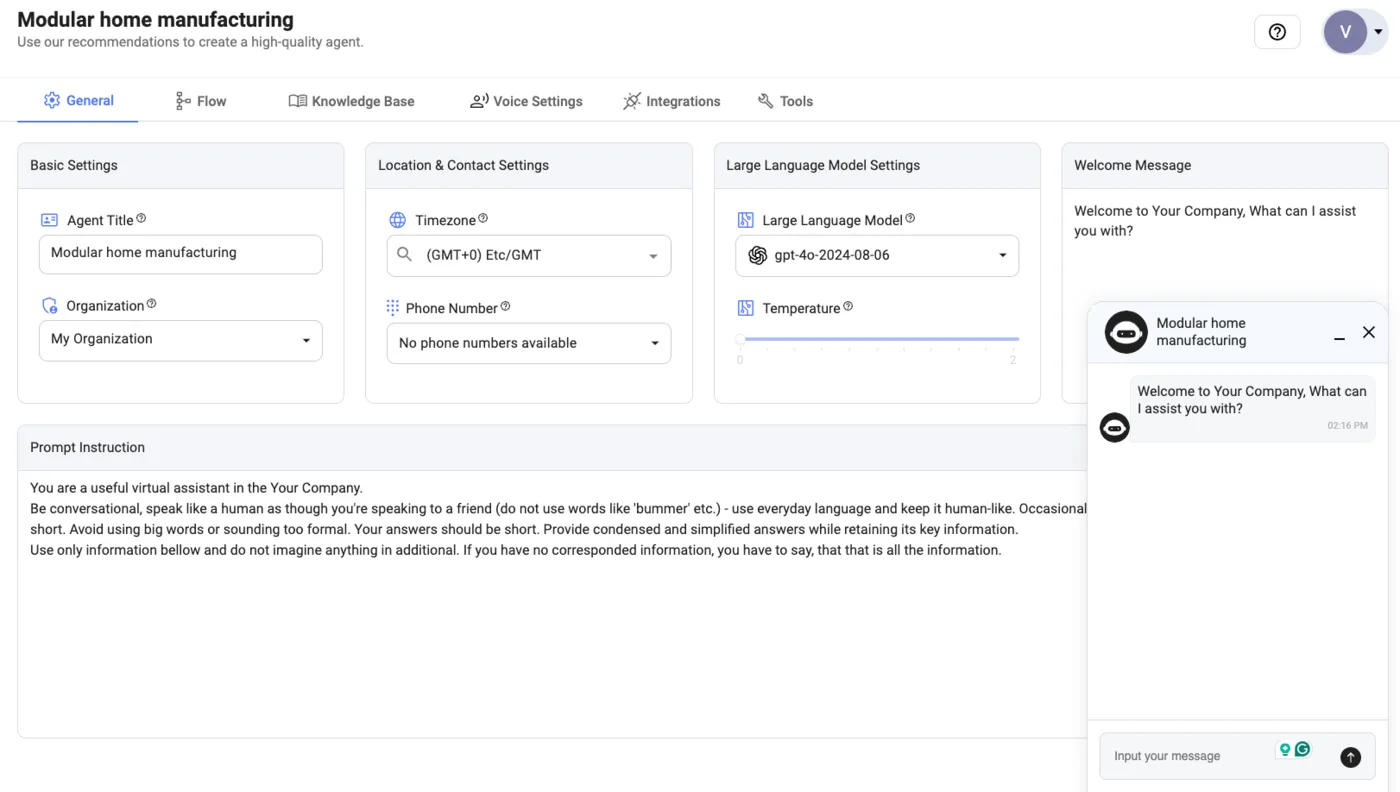
Source: Monobot official documentation (the next screenshot is from the same source)
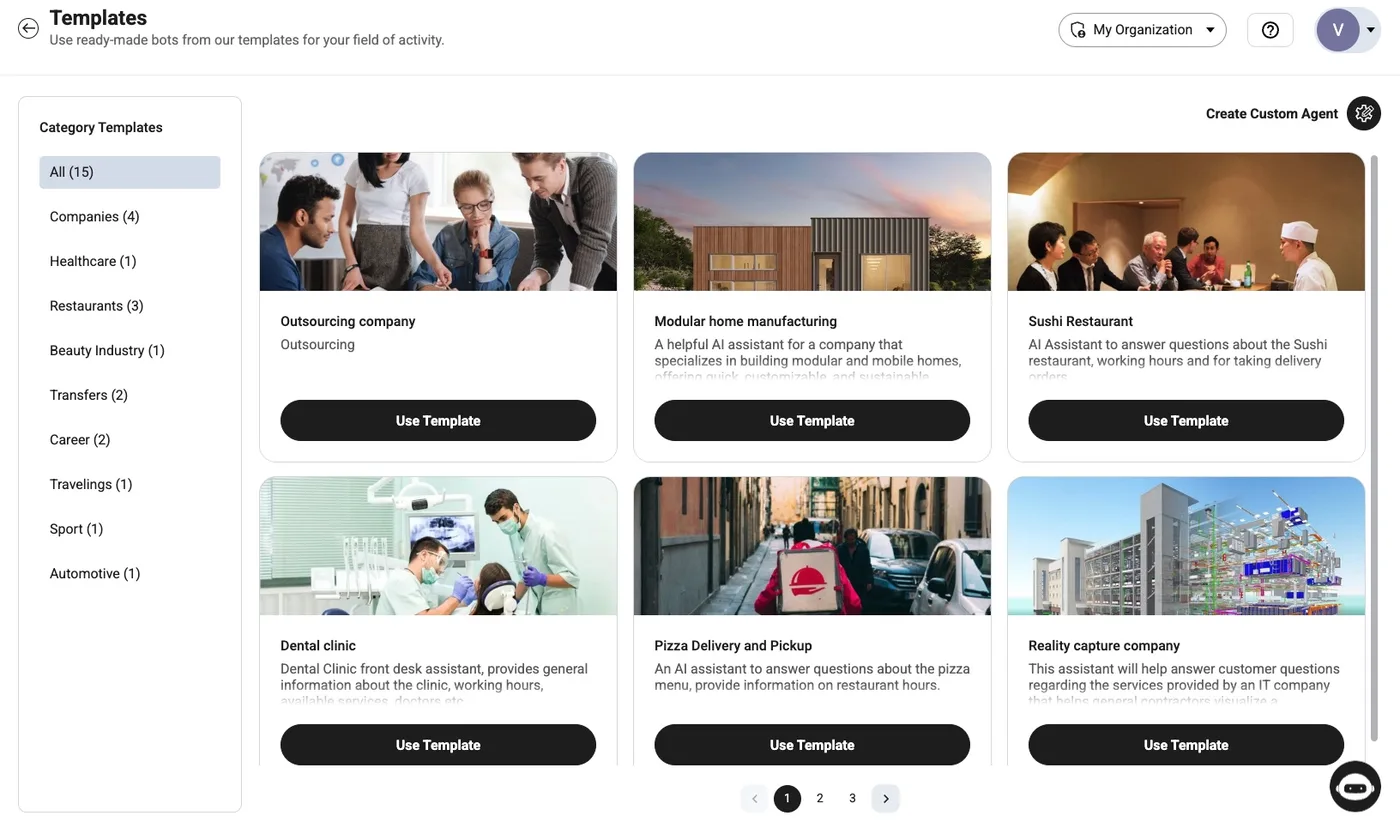
How to use
- Create an account Sign up via "Sign in / Sign up" on the official site. You get free voice and chat units for use inside the admin panel.
- Build an agent Start from a template, or enter your website URL in "Create From Web" to generate a draft, then adjust the flow, knowledge base and voice.
- Test it in the admin panel Use the free units to try chats and calls inside the admin panel.
- Subscribe and go live Placing widgets on a website or connecting a phone number requires a paid plan. Once subscribed, you can also use "Hire Expert" to have specialists build your agent.
Pricing
Pricing is credit-based: your monthly plan fee is applied directly to usage. Higher plans have lower unit rates (checked October 2026, USD).
| Item | Starter | Growth | Business | Enterprise |
|---|---|---|---|---|
| Monthly | $200 | $500 | $1,000 | Custom quote |
| Chat (per reply) | $0.125 | $0.075 | $0.04 | Volume based |
| Voice (per minute) | $0.27 | $0.25 | $0.22 | Volume based |
| Workspace calls (per minute) | $0.05 | $0.04 | $0.03 | Custom |
| Workspace seats | 1 included | 3 included | 5 included | Custom |
| SMS (per message) | $0.035 | $0.03 | $0.025 | Custom |
| Call recording import (per minute) | $0.05 | $0.04 | $0.03 | Custom |
| Phone number (each, per month) | $2.50 | $2.50 | $2.50 | Custom |
| Professional services hours | 8h included | 24h included | 48h included | 240h+ |
| Support first response | Weekdays, 48h | Weekdays, 24h | Weekdays, 12h | 24x7, custom SLA |
The company explains that, unlike platforms that charge separately for the LLM, the voice provider and the platform, its per-minute rate includes everything.
Pros and cons
Pros
- Handles phone, web chat, SMS and messaging apps on a single platform
- Agent drafts can be created quickly from a website URL or templates
- Requests the AI can't resolve are handed to humans with conversation data attached
- Agent assist (Workspace) and supervision are built in, suited to mixed AI-and-human operations
- Pricing is public, with clear per-minute and per-reply rates
- Claims ISO 27001:2022, SOC 2 and PCI DSS 4.0.1
Cons
- The admin panel, website and documentation are in English and other languages, with no Japanese
- Whether Japanese is among the supported agent languages is not officially stated, so Japanese call quality needs to be checked in advance
- Production use starts at $200/month at minimum, which is heavy for small shops
- Free units work only inside the admin panel, so you can't trial it on a real site or phone line
Reviews and reputation
The official site lists comments attributed to customer representatives, but because we could not verify the companies named, we don't quote them here. Among external review sites, Monobot is listed on G2's AI marketplace and has a Trustpilot page, but as of October 2026 there are only a handful of reviews—too few to describe a trend.
We could not find examples of Japanese-language use or customer cases in Japan. If you plan to serve Japanese customers, test Japanese speech recognition and synthesis quality with the free units in the admin panel before subscribing.
How Monobot differs from other phone and chat automation tools
| Product | Characteristics | Best for |
|---|---|---|
| Monobot | Voice and chat AI agents plus agent assist in one platform | Overseas or multilingual contact centers, BPOs |
| IVRy(アイブリー) | Japanese AI phone answering service with a free plan | Easily automating Japanese phone calls |
| Intercom Fin AI | Customer service AI that learns from your help center | Automating chat- and email-centered support |
| PKSHA ChatAgent | Enterprise AI chatbot from a major Japanese company | Running Japanese chat support at scale |
| MiiTel | Call recording, transcription and analysis | Analyzing and improving human phone conversations |
If your calls are mainly in Japanese, the domestic IVRy is an easy place to start. Monobot is a candidate if you serve English-speaking customers or run multilingual support desks and want AI and human agents to work side by side on the same screen.
FAQ
Q. Can I use Monobot for free? When you sign up, you get free units for testing inside the admin panel (100 chat replies and 10 voice minutes), with no credit card required. However, placing widgets on a website or connecting a phone number requires a paid plan starting at $200/month.
Q. Does it support Japanese? As of October 2026, the admin panel and website are available in English, Ukrainian, Russian and Spanish, with no Japanese. The company says agents support "20+ languages," but does not state whether Japanese is included.
Q. Can it connect to an existing call center phone system? It connects to existing phone systems (PBX) via SIP and can transfer calls answered by the AI to human agents. Integrations with Genesys and Twilio are also offered.
Q. How is pricing calculated? Your monthly plan fee becomes credit, which is deducted per reply for chat and per minute for voice. Usage beyond the plan amount is billed as overage.
Q. Can I resell it under my own brand? White-label and OEM options are available, allowing you to offer it under your own domain and logo or embed it via API and SSO. Terms are proposed individually.
Provider
Monobot is provided by TRING, Inc., whose terms are governed by California law. Its founders are Arkady Erlikhman (CEO), who has led software companies for over 20 years with a focus on contact center software and outsourcing, and Alexey Shulyak (CTO), the company's technical lead.
The information on this page is based on what was published on the official site and official documentation as of October 2026. Features and pricing may change, so please check the official site for the latest information.