
Klang
: How to use it, features, and the business problems it solves
What is Klang?
Klang is an AI meeting-minutes and transcription service from Klang AI AB of Sweden. A meeting bot joins Zoom, Teams and Google Meet; in-person meetings are recorded with the mobile app or in the browser; and recorded audio or video can be uploaded. Klang transcribes 19 languages and automatically organizes summaries, decisions and to-dos. It answers questions across past meetings, citing what was actually said, and supports automatic delivery to Slack, Notion, HubSpot and more, plus a read-only MCP server. Pricing (tax included, per user): Free ¥0 (unlimited transcription, last 30 days of records), Pro ¥1,180/month (¥980/month billed annually), Business ¥2,980/month, Enterprise by quote. Klang states that conversation data is not used to train AI (as of November 2026).
Business problems it solves




About "Klang"
What is Klang?
Klang (クラング) is an AI meeting-minutes and transcription service developed and provided by Klang AI AB of Sweden. A meeting bot joins online meetings, in-person meetings are recorded with the smartphone app, and recorded files only need to be uploaded — Klang then automatically handles everything from transcription to summaries, decisions and tasks. Recorded meetings can be searched together: ask something like "When was the price revision decided, and by whom?" and Klang answers across the meetings you can access, based on what was actually said.
Klang was developed in Sweden and launched its Japanese version in August 2026 (according to Klang AI AB's press release). It offers a Japanese web app, iOS and Android apps, and payment in Japanese yen, and accepts usage questions and adoption inquiries by email in Japanese. A key message is that even the Free plan has no limit on transcription time.
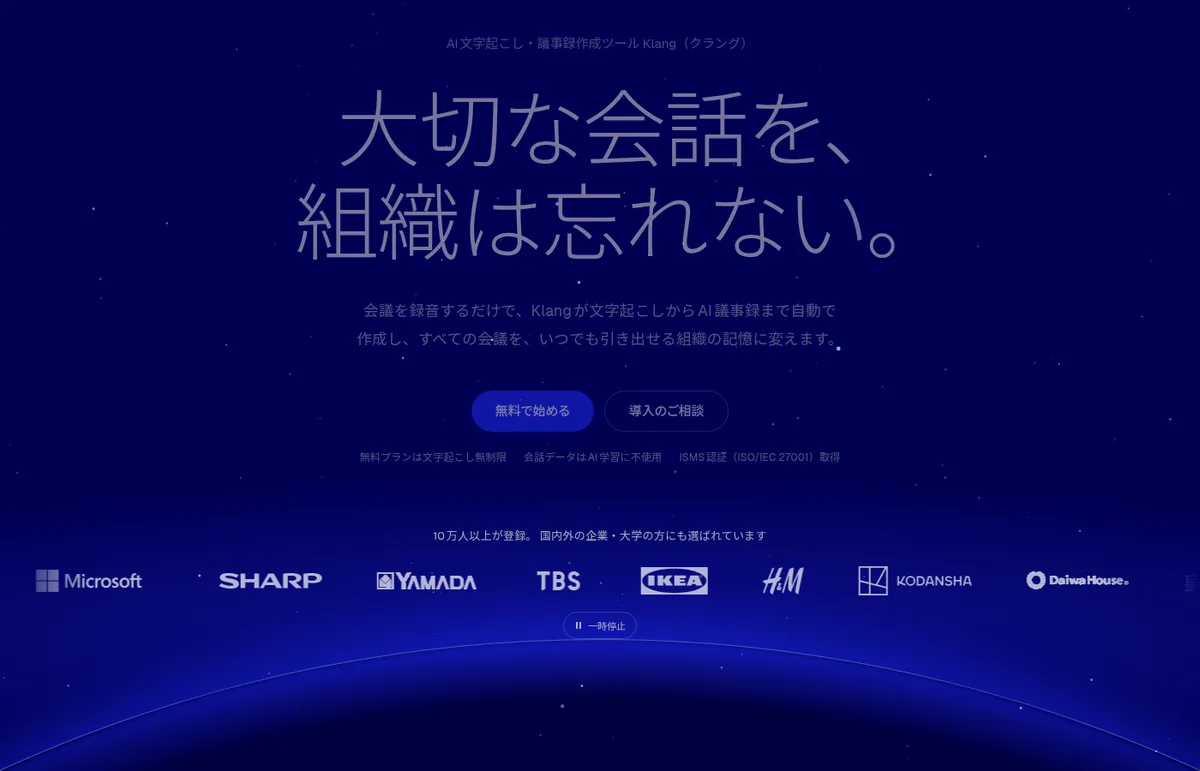
Source: Klang official website
How to use
- Create an account Sign up from "Start for free" on the official website. The Free plan requires no credit card. On a PC it runs in the browser, with no software to install.
- Capture meetings For Zoom, Microsoft Teams and Google Meet, connect your calendar once and choose conditions; the meeting bot then joins at the scheduled time and records. In-person meetings are recorded with the iPhone/Android app or in the browser, and recorded audio/video can be uploaded (up to 10 GB per file).
- Review the minutes When the meeting ends, a transcript and draft summary, decisions and tasks (with owners and deadlines) are ready. Registering company and product names in the glossary (Pro plan) makes correct spelling more likely.
- Share and look back Minutes can be exported to Word, Excel, SRT, VTT and more (Free plan: one text export per month). On the Pro plan, minutes can be sent automatically to Slack, Notion, CRMs and other tools after each meeting.
Features
01Capture
Online or in person, records gather in the same workspace.
- Meeting bot — Joins and records Zoom, Teams and Google Meet. Joins automatically every time via calendar integration (from the Free plan)
- Mobile app and browser recording — Record in-person meetings and interviews on the spot
- File upload — Recorded audio and video, up to 10 GB per file
- Transcription in 19 languages — Japanese, English, Korean, Chinese and more
02Summarize
AI takes over the work that follows transcription.
- AI summary, decisions and tasks — A draft of the minutes is created as soon as the meeting ends
- Automatic speaker identification — Records who said what (Pro plan; the Free plan only previews the opening part)
- Glossary — Register company names, personal names and industry abbreviations to reduce errors in proper nouns (Pro plan)
- Translation — Translate transcripts into 17 languages including English (Pro plan)
03Search and connect
Turns past meetings into records you can pull up later.
- Cross-meeting search and AI chat — Answers across the meetings you can access, citing actual remarks
- Scheduled analysis — Reads multiple meetings at set times (e.g. weekly) and organizes recurring issues (Pro plan)
- Automations — Sends meeting reports automatically to Slack, Microsoft Teams, Notion, Google Drive, OneDrive, Dropbox, HubSpot, Pipedrive, email or a webhook (Pro plan)
- MCP server — Read-only. Lets your own AI, such as ChatGPT or Claude, reference meeting records (all plans; up to 30 calls/day on Free, 1,000 on Pro)
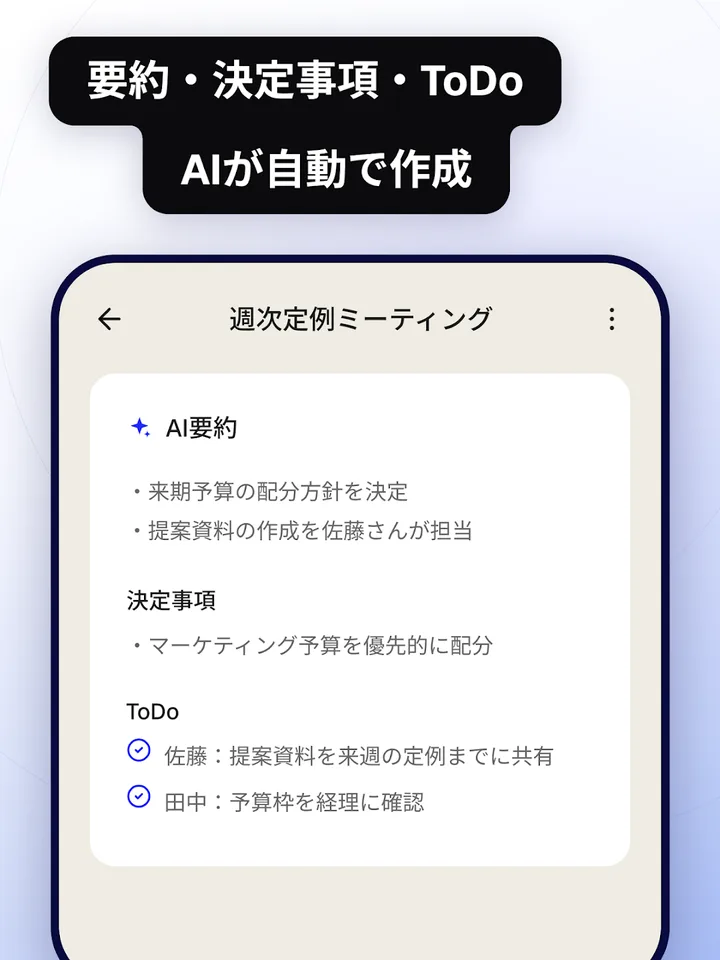
When a meeting ends, the AI organizes the summary, decisions and to-dos separately. In this screen, a summary such as "Decided the budget allocation policy for next term" and to-dos with owners have been created from a weekly meeting.
Ask in the search box something like "When and by whom was the budget policy decided?" and Klang answers across past meetings, listing the actual remarks behind the answer with the meeting name and date.
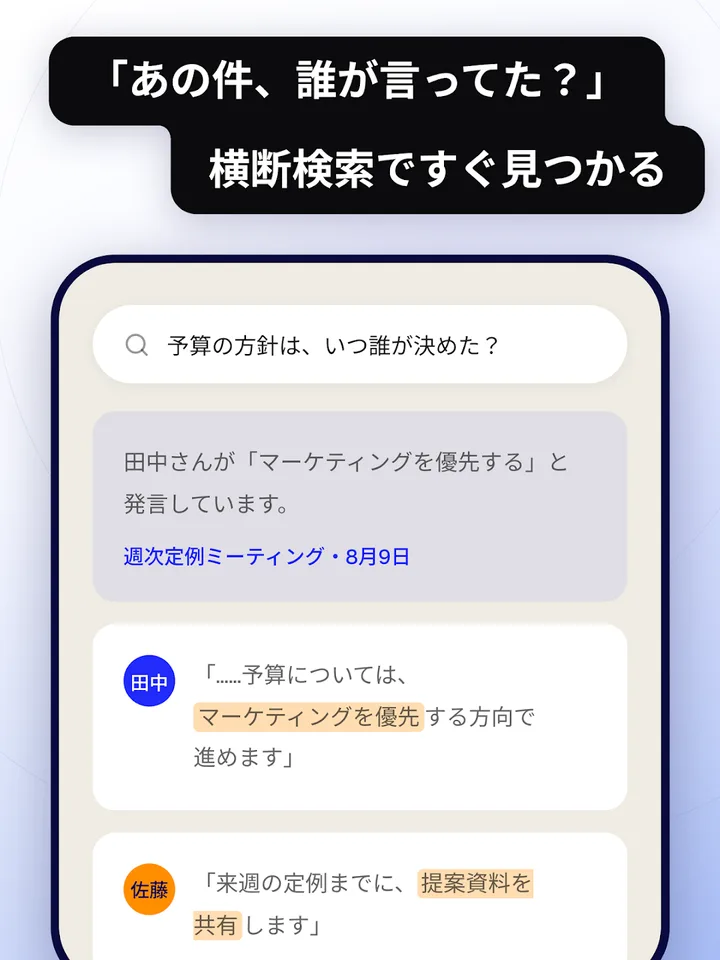
Source: Klang (Google Play)
How far the Free plan goes
According to Klang, both the Free and Pro plans have no limit on transcription time and use the same AI for transcription. Whether to pay depends not on transcription volume but on the following differences.
Pricing
| Plan | Price (tax included, per user) | Main features |
|---|---|---|
| Free | ¥0 | Unlimited transcription, meeting bot, apps, AI summary and chat. One user, last 30 days of records, one export per month. No credit card |
| Pro | ¥1,180/month billed monthly / ¥980/month billed annually (¥11,760/year) | Speaker identification, search across all records, unlimited exports, translation, integrations, scheduled analysis, glossary. 7-day free trial |
| Business | ¥2,980/month billed monthly / ¥29,800/year billed annually | Everything in Pro plus SSO (SAML 2.0, OpenID Connect), signing a DPA (data processing agreement), audit logs, usage statistics, meeting video recording, custom meeting-assistant name and image. No free trial |
| Enterprise | Quote (fixed fee to fit your budget) | Everything in Business plus private cloud with your own encryption keys (BYOK), on-premises installation, access permission management, custom retention periods, dedicated team and SLA |
- No initial fee; all listed prices include tax. Pricing is users × unit price and does not change with the number or length of meetings
- Cancelling during the Pro trial incurs no charge. After the trial, the first payment is charged on the billing cycle you chose
- Payment is by credit card, and cancellations or refunds after service starts are not accepted (per the Specified Commercial Transactions Act disclosure). You can cancel anytime; the contract ends at the end of the term
- Students get a discount applied automatically. Non-profits can ask for details
(As of November 2026, based on the official pricing page and the Specified Commercial Transactions Act disclosure)
Security and data handling
The official website states that conversation data is not used to train AI models and that Klang has obtained ISO/IEC 27001:2022 certification. Data is encrypted at rest with a key unique to each workspace, and communications are encrypted with TLS 1.2 or later. Deleted data is removed including backups, and the key that encrypted the file is destroyed as well.
Access protection includes two-factor authentication (2FA) and per-folder visibility settings. The Business plan adds SSO and audit logs, and the Enterprise plan supports "Klang Vault" (BYOK, where the customer holds the encryption keys) and on-premises deployment. Storage and processing regions are answered individually per configuration. A security checklist (Excel) for internal reviews is also available on the official website.
Pros and cons
Pros
- Even the Free plan has no limit on transcription time, and automatic meeting-bot joining is free
- The paid Pro plan is ¥980 per user per month billed annually (tax included), set by the number of users regardless of meeting count or length
- Search across past meetings answers questions citing actual remarks
- Automatic delivery to Slack, Notion, HubSpot and more, plus a read-only MCP server, lets other tools and AI use the records
Cons
- Automatic speaker identification is a Pro feature; the Free plan only previews the opening part
- The Free plan opens only the last 30 days of records and allows one export per month
- The Japanese version only launched in August 2026, and training of a Japanese-specific speech recognition model was still about to begin (as of the September 2026 announcement)
- Inquiries are handled by email; a phone number is disclosed only on request (per the Specified Commercial Transactions Act disclosure)
Reputation and reviews
The official website says more than 100,000 people have signed up. For reviews in Japan, Klang has a product page on ITreview, a review site for business IT products. When considering adoption, the reliable approach is to import one recording of your own meeting on the Free plan, check the transcript and summary, and then use the Pro plan's 7-day free trial to see whether you need speaker identification.
How Klang differs from other AI meeting-minutes tools
| Product | Highlights | Pricing (as of each product page's check date) |
|---|---|---|
| Klang | Klang AI AB of Sweden. Unlimited transcription and meeting bot even on Free. Answers cross-meeting questions citing remarks | Free ¥0 / Pro ¥980/month (annual, tax incl.) and up |
| Notta | Real-time transcription and speaker identification. Data stored in Japan | Free ¥0 / Premium ¥1,185 (annual, monthly equivalent, tax incl.) and up |
| Rimo Voice | Rimo LLC (Tokyo). Japanese-focused, automatic bot recording, 60+ languages | From ¥1,650/month (tax incl.) |
| tl;dv | From Germany. Meeting recording plus CRM updates and follow-up drafts | Free plan available / Pro from ¥36,960/year (annual, per seat) |
| YOMEL | PKSHA Infinity Inc. Records without a bot joining; billed by usage hours, unlimited IDs | Starter from ¥28,000/month (30 hours, excl. tax) |
| LINE WORKS AiNote | LINE WORKS Corp. Official version of "CLOVA Note β". Template-based AI summaries | Free / Solo from ¥1,440/month (annual contract, excl. tax) |
Details of other products in the table are as of the check date stated on each product page.
Klang suits people who want to start for free without worrying about transcription volume, and organizations that want to roll meeting records out to a team at a flat per-user price. If data must be stored in Japan, compare it with products that advertise domestic storage such as Notta or Rimo Voice, or discuss on-premises deployment under Klang's Enterprise plan.
FAQ
Q. Can I use Klang for free? Yes. The Free plan costs ¥0 per month and requires no credit card. There is no limit on transcription time, and it includes the meeting bot, apps, AI summary and chat. You can view the last 30 days of records and export one text file per month.
Q. Does it support Japanese meetings? Yes. It transcribes Japanese meetings and interviews and summarizes them in Japanese. It transcribes 19 languages including Japanese and English, and the Pro plan can translate into 17 languages including English.
Q. Is speaker identification free? Automatic speaker identification is a Pro feature. The Free plan only previews speaker names for the opening part. You can try it with the Pro plan's 7-day free trial.
Q. Is conversation data used to train AI? Klang states that it is not. Data is stored encrypted, and Klang says it operates under ISO/IEC 27001:2022 certification.
Q. Is it the same as the music transcription service Klang? No. Klang's company page also explains that it is separate from the music transcription service Klang (klang.io) and is a service that transcribes meeting and conversation audio into minutes.
Provider
Klang is developed and provided by Klang AI AB, headquartered in Helsingborg, Sweden (Swedish company registration number 559378-4571; responsible person: Niklas Silfverström). On September 28, 2026, it announced funding of about ¥240 million (SEK 15 million), to be used for R&D, hiring and international expansion, and said it would soon begin training a speech recognition model specialized for Japanese. The same announcement noted that the weights of its Swedish speech recognition model "Klang Pianissimo" were released on September 23, 2026. It also lists establishing a local base in Japan as a future goal.
Contact: support@klang.ai. Terms of sale are listed in the Specified Commercial Transactions Act disclosure on the official website.
The information on this page is based on what was published on the official website (pricing, company profile, Specified Commercial Transactions Act disclosure and security pages) and Klang AI AB's press release as of November 2026. Features and pricing may change, so please check the official website for the latest information.