Wordly
: How to use it, features, and the business problems it solves
Add bookmark
What is Wordly?
Wordly is an AI translation and captioning platform for meetings and events from Wordly, Inc. It bundles translation, captions, transcripts, and summaries into one price with every language included, covering dozens of languages and over 3,000 language pairs. Attendees join from a QR code or URL in the browser with no account needed. Pricing works as annual hour packages, from Starter at 10 hours to Enterprise at 500+. ISO 27001 and SOC 2 Type II certified.
Business problems it solves

About "Wordly"
What is Wordly
Wordly is an AI translation and captioning platform for meetings and events from Wordly, Inc. in the United States. It pioneered this market in 2019 and, according to the official site, has been used by over 6 million people across 120 countries.
Where most Japanese meeting translation tools start from interpreting an internal meeting, Wordly starts from conferences and events with hundreds or thousands of attendees. That shows in what it centres on: attendees reading captions in their own language on their own device, captions displayed on venue monitors, and audio fed straight from the sound mixer — the practical machinery of running an event.
Its second distinguishing trait is how it charges. Wordly bundles translation, captions, transcripts, and summaries into one price, with every supported language included. Costs do not stack up as you add languages, which makes budgeting predictable precisely when an event is most multilingual.
Four products in a single price
The Wordly Portal gives an organizer one screen holding the hours remaining on their package, recent usage, and the schedule and history of sessions. Organizers create a session in advance and get a Session ID to hand out to attendees.
Only the host needs an account. Attendees download nothing, create no account, and share no personal information — they join from a QR code or URL in the browser.
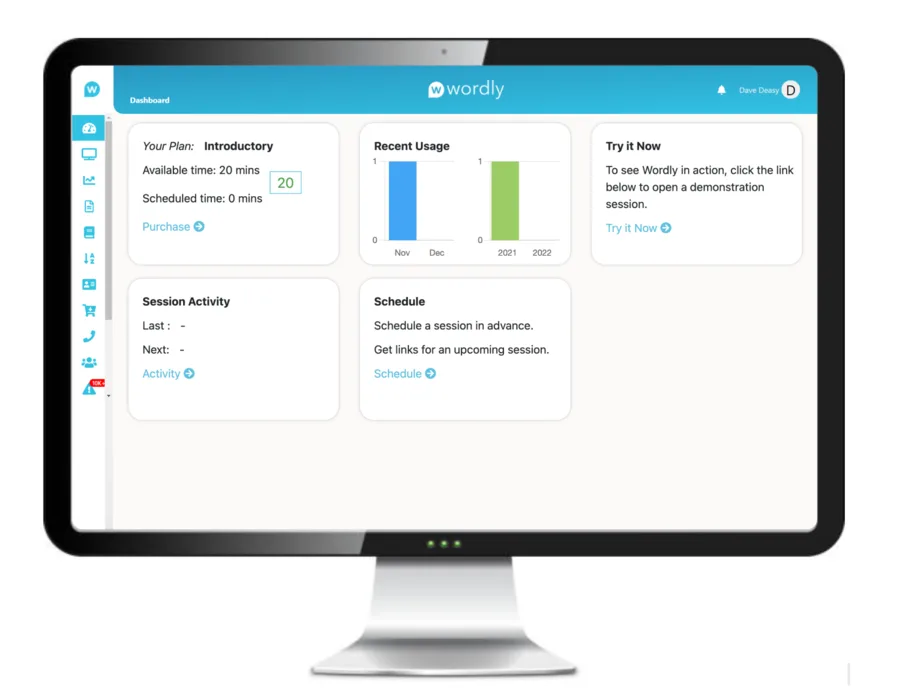
Source: Wordly official site (subsequent screen images are from the same source)
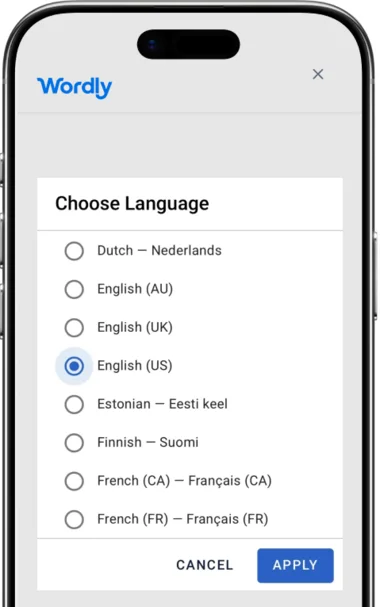
An attendee opens the QR code or link they were given and simply picks the language they want to read in. The picker lists regional variants alongside base languages — Dutch, English (AU / UK / US), Estonian, Finnish, French (CA / FR).
Because Wordly translates multi-directionally, dozens of languages produce over 3,000 language pairs. English to Spanish, but equally Spanish to Vietnamese or French to Spanish, all within the same session.
Any modern browser works — Chrome, Firefox, Safari, Edge — and each attendee chooses whether to read captions or listen to translated audio.
Four routes to get audio into Wordly
How audio is captured can be matched to the shape of the venue.
Audio into Wordly
- Integrations with Zoom, Teams, Cvent, etc.
- Wordly Join Web App (computer)
- Wordly Mobile App (iOS / Android)
- Direct streaming over RTMPS
Transcription and translation
AI transcribes and translates in real time. Glossaries and blocklists control how proper nouns are handled.
Delivered to attendees
- Captions read on their own device
- Translated audio heard on their own device
- Captions on venue monitors
- Overlaid on the presentation
Once it is over
- Session transcript
- Summary of key takeaways
- Transcript translated into other languages
- MP3 export for dubbing video
Running in-person, virtual, and hybrid at once carries no additional charge.
The recommended setup connects the room's audio mixer directly to a tablet or laptop, so the AI receives high quality sound.
How to use it
-
Buy an hours package
The organizer purchases a package of translation minutes. Online purchase is available, and new accounts are typically activated within 5–10 minutes.
-
Go through onboarding
A Customer Success team member covers account setup, admin training, integration assistance, glossary creation, rehearsal tests, presenter coaching, and technical support.
-
Create a session
Set up the event in the Wordly Portal. Setup takes a few minutes, and after onboarding Wordly says a meeting can be readied in under 10 minutes.
-
Share the Session ID
Distribute it by QR code or URL. Captions can also be shown on venue monitors or overlaid on the slides.
-
Collect transcripts and summaries afterwards
A transcript is generated for every session and can be shared with attendees. Summaries support post-event communication and reporting.
Pricing
Pricing works as annual hour packages. The dollar amounts are not published — you get a quote — but the tiers are (as of 22 August 2026).
| Plan | Annual hours |
|---|---|
| Starter | 10 hours |
| Pro | 25 hours |
| Pro + | 50 hours |
| Corporate | 100 hours |
| Corporate + | 250 hours |
| Enterprise | 500+ hours |
Four things about the charging model are worth holding on to.
- Every plan includes all four products and all languages — translation, captions, transcripts, and summaries, plus the full language set, at one fixed price
- The term is 12 months and hours split across sessions — unused hours may roll over (confirm with your sales rep)
- No rounding up — a 30-minute session consumes 30 minutes
- Higher tiers add features — SSO, configurable data storage, shared glossaries, transcript translation, and video captions and subtitles arrive progressively
Discounts cover volume (10–30% or more), multi-year commitments, non-profit and NGO (an additional 10% on Pro and above), and education. On-site or remote live event support is optional.
Security and accessibility compliance
Being built for settings where language access and accessibility are legally mandated — government, education, healthcare, listed-company investor relations — is what most clearly separates Wordly from other meeting translation tools.
Track record and reputation
(120 countries, vendor-published)
(multi-directional across dozens of languages)
(as listed on the Inc. 5000)
(vendor-published)
Inc. magazine's Inc. 5000 listed Wordly with 668% growth, ranking it the 52nd fastest-growing software company. The figure of over $200 million in cumulative customer savings is Wordly's own published number, based on comparison with hiring human interpreters.
The savings figures, including claims of "up to 90% less," are all published by Wordly itself. Actual return depends on how often you meet, how many languages you need, and local rates for human interpretation. Because pricing is by hour package, the practical approach is to total your expected annual meeting hours first, then request a quote.
How it differs from other AI interpretation tools
| Product | Home ground | Pricing model | Delivery to attendees |
|---|---|---|---|
| Wordly | Conferences and events | Annual hour packages | QR code, URL, venue monitors, slide overlay |
| Interprefy | Large events, alongside human interpreters | Custom quote | Dedicated app, platform integrations |
| KUDO | Meetings and events (human interpreters bookable) | Custom quote | Native Teams integration, widget |
| Sentio | Internal meetings, small to mid-size events | Flat rate (from ¥3,300/month) | QR code, URL |
| VoicePing | Internal meetings, trade shows | Metered plus flat rate; events by the day | QR code, URL, monitor captions |
Wordly suits organizations running multilingual events and all-hands meetings continuously through the year. Price staying flat as languages multiply, and accessibility compliance, are where it pays off.
It does not suit everyday one-to-one sales calls or small recurring meetings. For those, Sentio with its flat rate, or kotoba running entirely on a phone, are lighter in both setup and cost. If Japanese-language support matters, the domestic VoicePing also belongs in the comparison.
Information on this page is based on what the official site published as of August 2026. Please check the official site for current specifications and pricing.