KUDO
: How to use it, features, and the business problems it solves
Add bookmark
What is KUDO?
KUDO is a live speech translation and captioning platform from KUDO, Inc. in the United States. It pairs AI speech translation covering over 70 languages around the clock with a marketplace of more than 12,000 professional interpreters bookable on demand, reaching over 200 languages including sign languages. Microsoft Teams has a native integration, and one-off plans need no annual subscription. Pricing is quoted individually. ISO 27001 and SOC 2 Type 2 certified.
Business problems it solves

About "KUDO"
What is KUDO
KUDO is a live speech translation and captioning platform from KUDO, Inc. in the United States, built to let internal meetings, corporate training, and global events run in any language.
KUDO is structured in two tiers, AI and human. AI speech translation covers over 70 languages including regional variants, available 24/7, and on top of it sits a marketplace of over 12,000 professional interpreters bookable on demand. Counting human interpreters, coverage reaches over 200 languages including sign languages.
(spoken and signed, including human interpretation)
(with regional variants, 24/7)
bookable on demand
(vendor-published)
Attendees just pick their language
KUDO asks almost nothing of the attendee. On a laptop or a phone, they open a "Join the meeting in your language" screen in the browser, pick a language, and receive audio and captions.
Each language in the list carries an icon, so whether it is AI translation or a human interpreter is visible at a glance. Mixing staffed languages and AI languages within the same event does not confuse anyone.
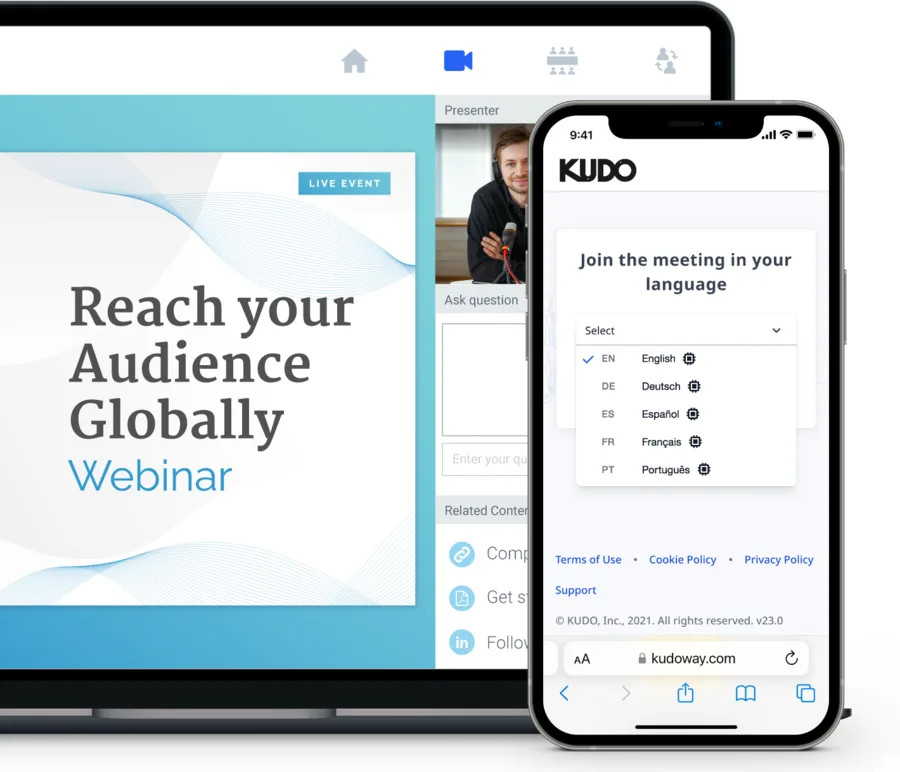
Source: KUDO official site (subsequent screen images are from the same source)
Professional interpreters, booked on screen
KUDO's other pillar is the Interpreter Marketplace. Select a platform, select the languages you need, book the interpreters — three steps completed entirely in the admin screen.
Once booked, a confirmation screen shows the meeting's language pairs, date and time, subject, and duration. For Zoom, it explains right there that KUDO Pro interpreters will join the meeting as participants and interpret as you speak, and that attendees are encouraged to wear a headset so interpreters can hear them clearly.
Arranging interpreters through an agency often takes days. KUDO turns it into an on-demand purchase.
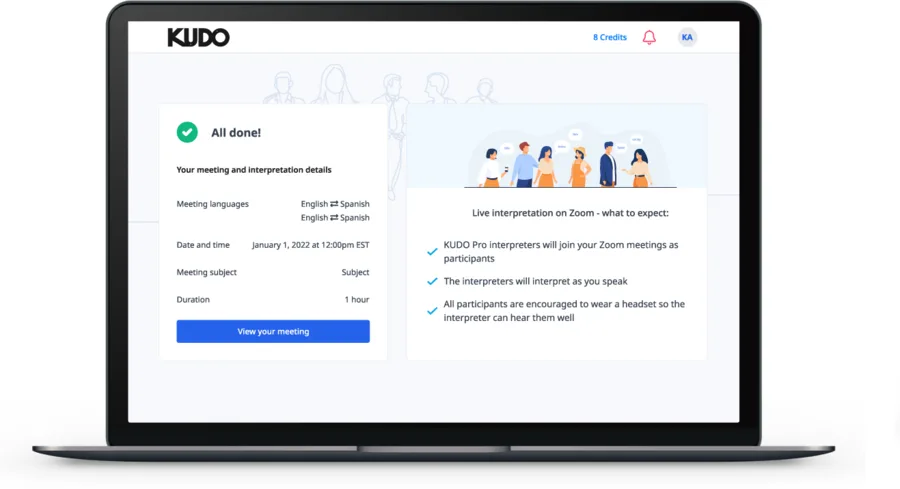
What the AI speech translation does
The KUDO AI Speech Translator side offers the following.
01Listen and read
- Audio and captions — live audio and captions in over 70 languages, in either "Audio & Captions" or "Captions-Only" mode
- AI voice — choose an AI-generated voice that imitates the natural flow of speech
- Any device — multilingual captions and audio from any laptop or smartphone
02Run the meeting
- Voting — poll attendees during a session
- Request to Speak — attendees can ask for the floor
- Recording downloads — download recordings in each language for offline use afterwards
03Use it anywhere
- Platform integrations — Microsoft Teams, Zoom, Webex, ON24, Bizzabo, Hubilo, EventMobi and more. Teams has a native integration; the others use an embedded widget
- In-person, hybrid, venue installations — not limited to online; in-person events and permanent venue setups are supported
How to use it
-
Decide the languages and the modality
Judge session by session whether AI speech translation is enough or a human interpreter is needed. The official site offers a quiz to help pick the right configuration.
-
Choose a plan
Pick from Marketplace, Pay As You Go, or the Annual Plan depending on whether this is a one-off event or a recurring meeting.
-
Connect your platform
Microsoft Teams uses a native integration; Zoom, Webex, ON24 and others connect through an embedded widget. In-person events connect to the venue AV.
-
Book interpreters if you need them
In the Interpreter Marketplace, choose the platform, the languages, and the interpreters.
-
Tell your attendees
They pick a language in the browser, and that is all. Afterwards, recordings can be downloaded in each language.
Pricing
Amounts are not published, but three contract shapes are (as of 22 August 2026).
| Plan | For | What it is |
|---|---|---|
| Marketplace | Booking interpreters as needed | No annual subscription. Book interpreters on demand across 200 languages |
| Pay As You Go | A one-off event | No annual subscription. Human interpretation or AI translation |
| Annual Plan | Organizations using it continuously | From 50 hours a year. Combines human interpretation and AI translation |
Discounts are offered on annual billing. Specific figures require contacting sales.
The option of "no annual subscription for a one-off event" is unusual among meeting translation tools. On the other hand, because amounts are undisclosed, if you need to fix a budget first then [Wordly](https://ai-best-search.com/products/wordly) with its published hour tiers, or the event plan from [VoicePing](https://ai-best-search.com/products/voiceping) with its published day rates, are easier starting points for comparison.
Security
Sectors and track record
Alongside corporations, the official site highlights government, education, and houses of worship as core sectors. Use cases span internal meetings, town halls and all-hands, training and education, webinars, global events, and customer and UX interviews.
Published case studies include a sports car manufacturer and VINCI, both running multilingual events that combined AI and human interpretation. KUDO is also the official interpreting technology sponsor of LocWorld for 2026–2027, the conference of the translation and localization industry.
The site cites third-party research as the case for adoption: 59% of employees working in another language worry about missing information (Foreign Language Anxiety Study, 2022); 80% of workers are more productive when spoken with in their native language (Forbes Insights / Rosetta Stone survey); and 25% of employees lose business due to a lack of foreign language skill (American Council on the Teaching of Foreign Languages).
These research figures are quoted by KUDO on its own site. The sources are named, but note that none of them measures KUDO's own product outcomes.
How it differs from other AI interpretation tools
| Product | Human interpreters | AI languages | One-off use | Pricing |
|---|---|---|---|---|
| KUDO | Yes (12,000+; 200+ languages including sign) | 70+ | Yes (plans with no annual subscription) | Undisclosed |
| Interprefy | Yes (6,000+, sign language included) | 6,000+ language combinations (captions) | Quoted individually | Undisclosed |
| Wordly | No (AI only) | Dozens of languages, 3,000+ pairs | Annual packages only | Hour packages |
| DeepL Voice | No (AI only) | 40+ (captions) | Quoted individually | Undisclosed |
| Sentio | No (AI only) | 44 into 77 | Yes (one-off at ¥3,300) | Published |
KUDO suits organizations whose sessions mix "AI is fine here" with "this one needs a human," and where that split changes from event to event. Because the Marketplace lets you book interpreters without an annual contract, you can start before your usage pattern is clear. It is also a candidate if you want Microsoft Teams through a native integration.
It does not suit everyday internal meetings or one-to-one sales calls. Sentio and VoicePing are lighter and clearer on cost there. If you are comparing the same human-plus-AI structure, Interprefy, with its European data residency, is the direct comparison.
Information on this page is based on what the official site published as of August 2026. Please check the official site for current specifications and pricing.