What Jev Is [October 2026]: The AI That Generates No Text — How to Use It, Pricing, and How It Differs from Microsoft-Decision-1
On 9 October 2026, Microsoft released Microsoft-Decision-1, a decision model at the same price as Jev ($0.042 per million input tokens, free output) and with the same question types. This article explains what Jev — released by TypeSafe AI on 15 September 2026 — is: a System One model that generates no text and returns Choice (classification), Score (rating) and Noul (a 0–1 truth value) with probabilities; speculative fan-out, where stacking questions barely changes latency; how to get started from the waitlist to the Python SDK, HTTP API and Claude Code skill; routing low-confidence answers to people; and use cases. It then compares Jev with Microsoft-Decision-1 (access, context length, availability, Japanese support), explains which to choose and whether you can use them from Japan, and covers Jev's latest status in October (Series A, rate limits, OpenRouter listing). It also covers the official note that CJK accuracy is lower than English and the weak spots TypeSafe publishes itself.

Updated 13 October 2026: On 9 October 2026 (US time), Microsoft released Microsoft-Decision-1, a decision model at the same price as Jev ($0.042 per million input tokens, free output). Its question types are the same three as Jev's — Choice, Score and Noul. The "October 2026 update" section covers how the two differ, which to choose and whether you can use them from Japan, and Jev's availability and rate limits have been updated to the latest official information.
On 15 September 2026, TypeSafe AI came out of stealth with $40 million in funding and released its first model, Jev, in early access. The Register covered it the next day as "a model for talking to machines rather than people," it spread across X and Bluesky, and Japanese engineering communities — Qiita and Zenn — filled with hands-on write-ups. Qiita even ran an official campaign, "Have you tried it yet? Let's play with the decision-specialised AI Jev," from 16 September to 2 October.
The reason it caught on is not the benchmarks. It is how easy the positioning is to grasp: an AI that does not generate text. Jev does not chat. Instead of answering a prompt with prose, it picks one of the options you defined up front and returns it with a probability attached. What comes back is "technical", 1.6, 0.92 — values you can drop straight into an if.
This article covers what Jev actually returns, how to choose between its three question types (Choice, Score, Noul), its pricing and speed, the path from the waitlist to your first request, and what to watch for when your input is Japanese — based on TypeSafe AI's official docs and blog plus published hands-on reports.
The short version
Jev is a "System One model," a new class of AI that writes no text. Give it a state (text or JSON) and a set of typed questions, and it returns Choice (classification), Score (rating) and Noul (a 0–1 truth value), each with probabilities. No string is generated, so there is nothing to parse and nothing to validate away.
It is fast and cheap: 70–500 ms end to end, $0.042 per million input tokens, and output tokens are free. Questions are evaluated in parallel, so stacking ten of them into one call barely changes the response time. That is the design decision that separates it from an LLM.
But the official docs state plainly that CJK — including Japanese — is accepted with lower accuracy than English. English is the first language of this model. Shipping it on non-English input means measuring on your own labelled data before you set a confidence threshold.
On 9 October 2026 Microsoft released Microsoft-Decision-1 with the same price and the same question types. The difference is how they are offered. Jev is in early access (waitlist) with a 64,000-token context; Decision-1 can be deployed right away on Microsoft Foundry with an Azure subscription (preview), with a 32,768-token context. If you want contracts and authentication in Azure, look at Decision-1; if you need long inputs or the official SDKs and agent skills, look at Jev.
October 2026 update: Microsoft releases Microsoft-Decision-1 at the same price
On 9 October 2026 (US time), Microsoft announced Microsoft-Decision-1, a decision-specialized model (Microsoft's announcement). It generates no text and returns a probability for each fixed answer option, which makes it the same kind of model as Jev. The price matches Jev too: $0.042 per million input tokens, with free output.
 Microsoft-Decision-1 | A decision model with Jev's price and question types, available through Azure
- What it is — Alibaba's Qwen3.5-9B (part of the Qwen family), post-trained by Microsoft. Microsoft says it plans to rebase it on other models, including Microsoft AI (MAI) and OpenAI models
- Question types —
noul(probability that something is true),choice(one option from a set) andscore(a value on an ordered scale). The type names and the request shape — astateplusquestions— are nearly identical to Jev's, and Microsoft's own documentation describes the request pattern as "similar to a system-one API" - Availability — Microsoft Foundry (listed as Preview in the model catalog) and OpenRouter (served by Azure)
- Context and input — 32,768 tokens. Text only (string or JSON); no images, audio or video
- Internal use at Microsoft — Xbox Research used it to process more than 10,000 pieces of open-ended feedback, the Copilot team uses it to measure the quality of chat and agent responses, and Microsoft Discovery uses it to decide how to replan after an agent evaluates an experiment
Microsoft says it achieved the highest accuracy across 36 benchmarks kept blind from training (nearly 150,000 questions), with median latency about 35 times faster than GPT-6 Sol. The comparison reportedly included top public models from JevBench, a public leaderboard for decision models, and the announcement was later updated "to add benchmarks for Jev on accuracy and calibration." All of these are Microsoft's own measurements; no third-party verification has been published yet.
See Microsoft-Decision-1 details
How Jev and Microsoft-Decision-1 differ
| Aspect | Jev | Microsoft-Decision-1 |
|---|---|---|
| Provider | TypeSafe AI (US startup) | Microsoft |
| Released | 15 September 2026 | 9 October 2026 |
| Input price (per million tokens) | $0.042 | $0.042 |
| Output price | Free | Free |
| Question types | Choice, Score, Noul | choice, score, noul |
| Confidence | A dedicated value on Choice and Score | Not described in the docs (decide from per-option probabilities) |
| Context length | 64,000 tokens (32,000 for state plus the longest question) | 32,768 tokens |
| Input | Text only | Text only |
| Access | TypeSafe AI's API, OpenRouter | Microsoft Foundry, OpenRouter |
| Status | Early access (waitlist) | Preview (per the Foundry model catalog) |
| What you need to start | An invitation from the waitlist | An Azure subscription with a payment method |
| Developer tooling | Official Python and JavaScript/TypeScript SDKs, agent skill, cookbooks | HTTP API (Entra ID or API key), deployment via Azure CLI |
| Japanese | Accepted, but officially "less accurate than English" | No per-language information (only says the evaluation included multilingual tasks) |
| Published weak spots | A dedicated page listing six (can't count, weak at comparing dates, etc.) | Sensitive to wording and option order, no rationale, not the sole basis for consequential decisions about people |
Prices are shown excluding tax. Amounts billed through Azure depend on your contract currency and tax treatment.
Can you use them from Japan?
- Microsoft-Decision-1 — With an Azure subscription you can deploy it from the Microsoft Foundry model catalog. Two deployment types are available:
GlobalStandard, which may process inference in any Azure region, andDataZoneStandardin selected regions, which keeps processing inside a data zone. As of 13 October 2026, Microsoft's official region list does not yet show whether the Japan regions (Japan East / Japan West) are available. If your data must be processed in Japan, check the regions offered in the Foundry portal before deploying - Jev — Nothing restricts use from Japan, and Japanese engineers have reported getting into the console. It is in early access, though, so you need to wait for an invitation from the waitlist
- Japanese accuracy — Neither publishes a Japanese accuracy figure. Jev states that CJK is "less accurate than English," and Decision-1 gives no per-language information. Either way, measure on your own Japanese data before relying on it
Which one to choose
- You want contracts, billing and authentication in Azure (managed with Entra ID, processed inside a data zone) → Microsoft-Decision-1
- You want to judge long inputs in one go (64,000 tokens per request, many stacked questions via speculative fan-out) → Jev
- You want to build quickly with official SDKs, agent skills and worked examples → Jev
- You can't decide → Because the request shapes are nearly identical, send the same state and questions to both and compare accuracy and latency on your own labelled data
OpenAI also released a similar "Decisions API" in public beta on 6 October 2026 (OpenAI documentation). It runs only on gpt-6-luna, costs $0.10 per million input tokens with free output, and accepts image input. In a single month, decision models have become a category with three vendors.
What changed for Jev in October
- An $870 million Series A — Led by Andreessen Horowitz, with Sequoia Capital and DCVC participating, at a $7.5 billion valuation (official blog; reported as announced on 9 October). That is less than a month after the $40 million seed in September
- Its first published case study — The hiring marketplace Jack & Jill replaced Gemini 3.1 Flash Lite with Jev, cutting cost per 1,000 candidates from $0.755 to $0.092 (88% lower) and median screening time from 20.3 to 10.3 seconds (official blog)
- Still in early access — The official site still says "early access." Rate limits are now 100,000 tokens per second / 80 requests per second (when this article was first published in September they were 250,000 tokens per second / 1,200 requests per minute)
- Listed on OpenRouter — Jev 1.13 has been on OpenRouter since 17 September (same price). On 26 September "Jev Router," which picks the LLM and reasoning effort for each request, also appeared there
Why it blew up now
Three things landed in one week.
Out of stealth, model shipped
- TypeSafe AI announces $40M led by DCVC
- Forbes reports a valuation near $200M
- Jev opens in early access
The Doom demo spreads
- The Register covers the launch
- ~10 calls per second driving a Doom bot
- Roughly $7 per hour to run
Into developer communities
- Qiita official campaign (through 2 Oct)
- Hands-on scraps and explainers on Zenn
- "The AI that doesn't generate text" becomes the hook
About the Doom demo: the engineer behind it openly admits a non-AI Doom bot plays better. It is a demonstration of speed and cost, not a performance claim.
What matters is that the conversation is not "replace the LLM." It is "take the judgement calls out of the LLM." Classification, prioritisation, guardrail checks — work we have been sending to GPT or Claude for want of anything better, asking for JSON back and retrying whenever the JSON broke. Jev handles exactly that slice.
Vendor-published figure
Output tokens are free
State capped at 32k
Led by DCVC, Sept 2026
What a System One model is
TypeSafe AI positions Jev as the first release in a new model class it calls System One models. The name comes from Daniel Kahneman's Thinking, Fast and Slow.
- System 1 — fast, automatic, intuitive. Reading a face, hearing anger in a sentence
- System 2 — slow, deliberate, step by step. Long multiplication, weighing a design
Today's LLMs, chain-of-thought included, are built toward System 2. Yet most of the judgement a production system needs is System 1 work: "which team owns this ticket," "is this urgent." Until now we have been wheeling out the System 2 machine every time.
The model name Jev comes from the economist William Stanley Jevons, known for the Jevons paradox — efficiency gains increase total demand rather than reducing it. The bet is that once a decision is cheap and fast enough, the number of decisions explodes.
How this differs from asking an LLM to classify
Classifying with an LLM
- You get back a string. JSON mode still needs validation
- It can invent a label you never defined
- No probabilities, so you cannot see hesitation
- Sequential sampling means seconds to tens of seconds
- More questions means slower and more expensive
Classifying with Jev
- You get back a typed value. Nothing to parse
- Answers cannot leave the set you defined
- A full probability distribution and confidence comes with it
- Parallel evaluation means 70–500 ms
- More questions barely changes the response time
The published comparison, in numbers. LLM figures are typical ranges across vendors.
| General-purpose LLM | Jev | |
|---|---|---|
| Output shape | Prose (a string) | Typed value plus probabilities |
| Parsing / validation | Needed even in JSON mode | Not needed |
| Sampling | Sequential | Parallel |
| Response time | 3–329 seconds | 70–500 ms |
| Input price (per MTok) | $0.20–$10 | $0.042 |
| Output price | ~5x input | Free |
| Suited to | Generation, long reasoning, dialogue | Classification, scoring, yes/no |
Read the "zero hallucinations" claim carefully. What TypeSafe is claiming is that the type cannot break: a label you did not define will never appear, and numbers stay inside the range you set. It is not a claim that the judgement is correct. As one Japanese hands-on put it: "the schema holding does not rule out the model misreading what the input means." Output-format guarantees and accuracy are separate things.
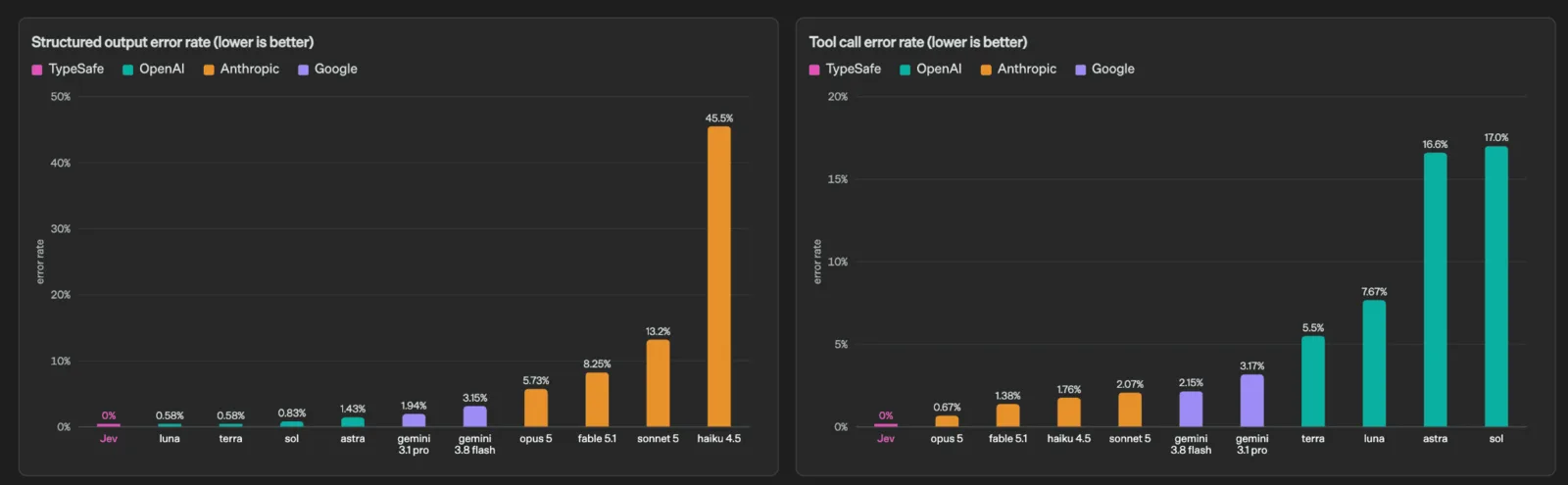
How often the type broke (left: structured output, right: tool calls; lower is better). Source: TypeSafe AI blog
These are the two charts TypeSafe publishes. On structured output error rate: Jev 0%, GPT-5.6 Luna 0.58%, Claude Haiku 4.5 45.5%. On tool call error rate: Jev 0%, Claude Opus 5 0.67%, GPT-5.6 Sol 17.0%. What is measured here is whether the answer came back in the type you specified — not whether the judgement was right. These numbers are why the retry path never quite goes away, even in JSON mode.
What comes back: Choice, Score and Noul
There are only three question types. That constraint is precisely why the output type cannot break.
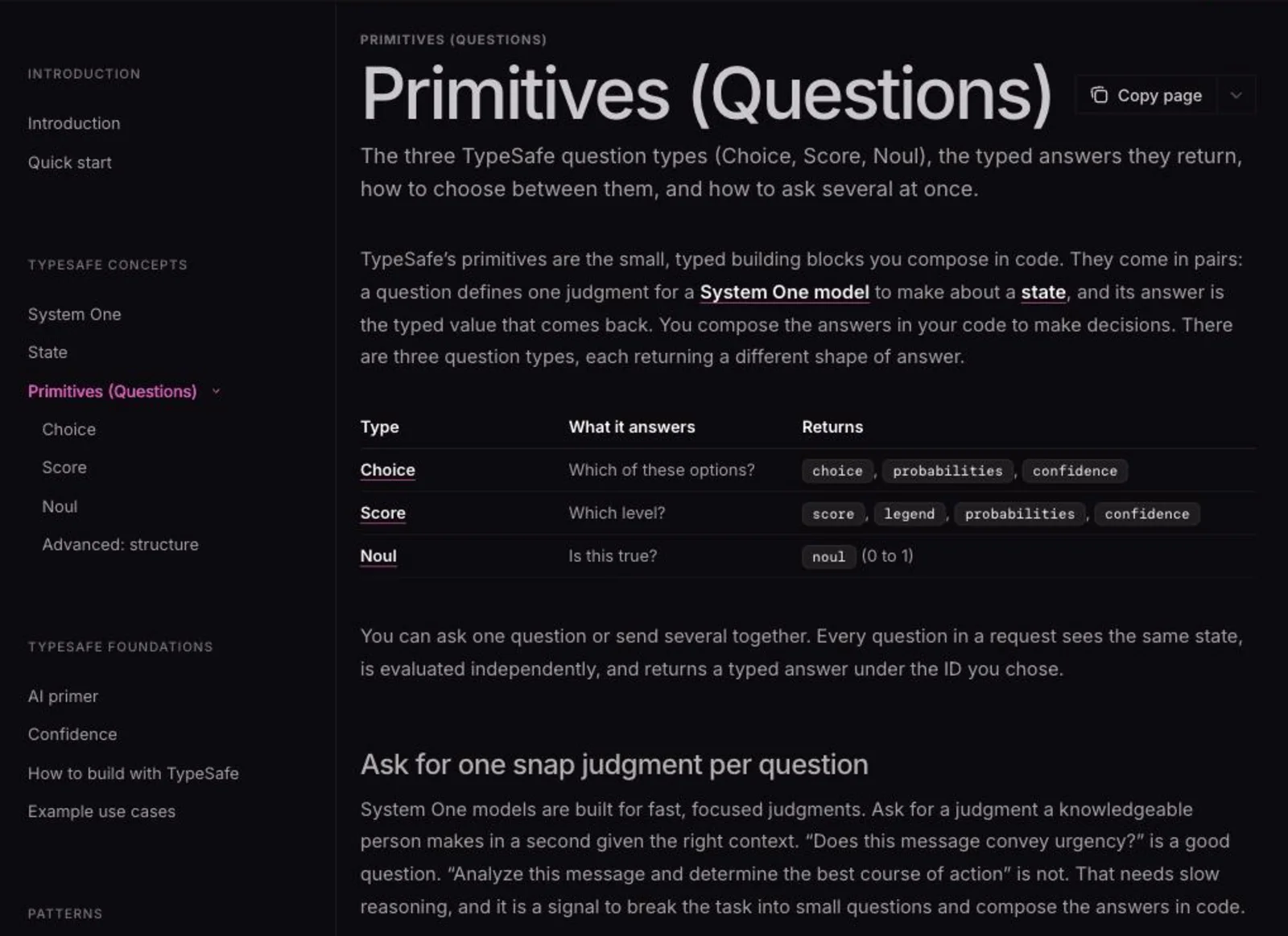
The Primitives page in the official docs; the left nav lists Choice, Score and Noul alongside Confidence and Patterns. Source: TypeSafe AI documentation
Choice — pick one from a fixed set
Unordered classification: ticket routing, document type, language detection.
Choice(
    instructions="Which team should handle this",
    criteria={
        "billing": "Payment or subscription issues",
        "technical": "Bugs or integration problems",
        "sales": "Pricing or account questions",
    },
)
You get choice (the selected key), probabilities (the distribution across every option) and confidence (how peaked that distribution is). The docs recommend including an other or "none of the above" option whenever inputs might fall outside your list.
Score — rate along ordered levels
For scales where each position means something: bug severity, customer frustration, skill level.
Score(
    instructions="How frustrated the customer appears",
    criteria=[
        "Calm, just stating facts",
        "Frustrated but civil",
        "Very angry, strong language",
    ],
)
score lands between levels — 1.6, say — so "somewhere between 1 and 2" is expressible directly. You also get legend (the level table), probabilities and confidence.
Noul — how likely is this statement to be true
Jev's own type. You ask a yes/no question, but what comes back is a probability between 0 and 1, not a boolean.
Noul(
    instructions="The message conveys urgency or time-sensitivity",
)
Near 1 is a strong yes, near 0 a strong no, near 0.5 means it cannot tell. Noul has no separate confidence field — the probability is the confidence.
The docs warn against confusing Score and Noul. Do not express "intermediate skill" as a Noul of 0.5; that reads as "I cannot tell whether this is true," not "it is in the middle."
Stacking questions costs you nothing in latency
This is where Jev pays off. Every question in a request is evaluated in parallel, and the docs state that adding questions "typically doesn't add any latency to the response."
That licenses a pattern called speculative fan-out: send even the questions that only matter on one branch.
response = client.system_one(
    state=ticket,
    questions={
        "category": Choice(...),        # always used
        "bug_severity": Score(...),     # only if it's a bug
        "has_repro": Noul(...),         # only if it's a bug
        "refund_requested": Noul(...),  # only if it's billing
        "frustration": Score(...),      # always used
    },
)
If the ticket turns out to be a feature request, you throw bug_severity away. That is fine. Where an LLM would need a round trip — classify, then ask again based on the result — you spend one.
Pricing and speed: output tokens are free
As of October 2026 there is still one published model, Jev 1.13.
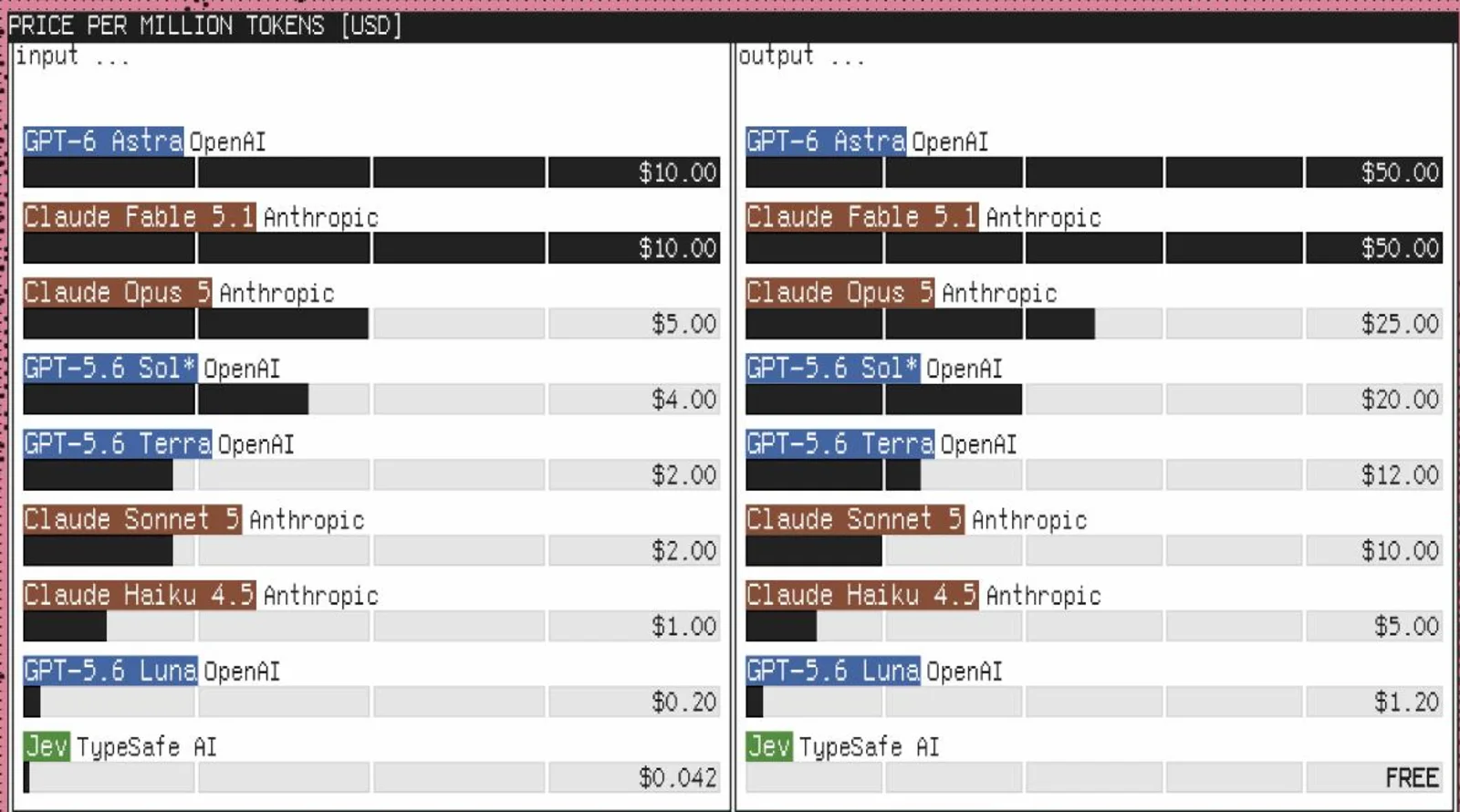
The comparison the official site leads with. In the output column on the right, only Jev reads FREE. Source: TypeSafe AI
The marketing headline is "238x lower input price than Claude Fable 5.1" and "193.6x faster, 444.6x cheaper" on System One workflows.
Those numbers are self-reported. Rather than an existing ground-truth benchmark, TypeSafe built its own evaluation frame — "workflow evals" — using predictions from GPT-6 Astra and Fable 5.1 as reference probabilities. Neither the benchmark names nor the contents of the four workflows are published, and no independent verification exists yet. Measure the ratio on your own workload before you commit.
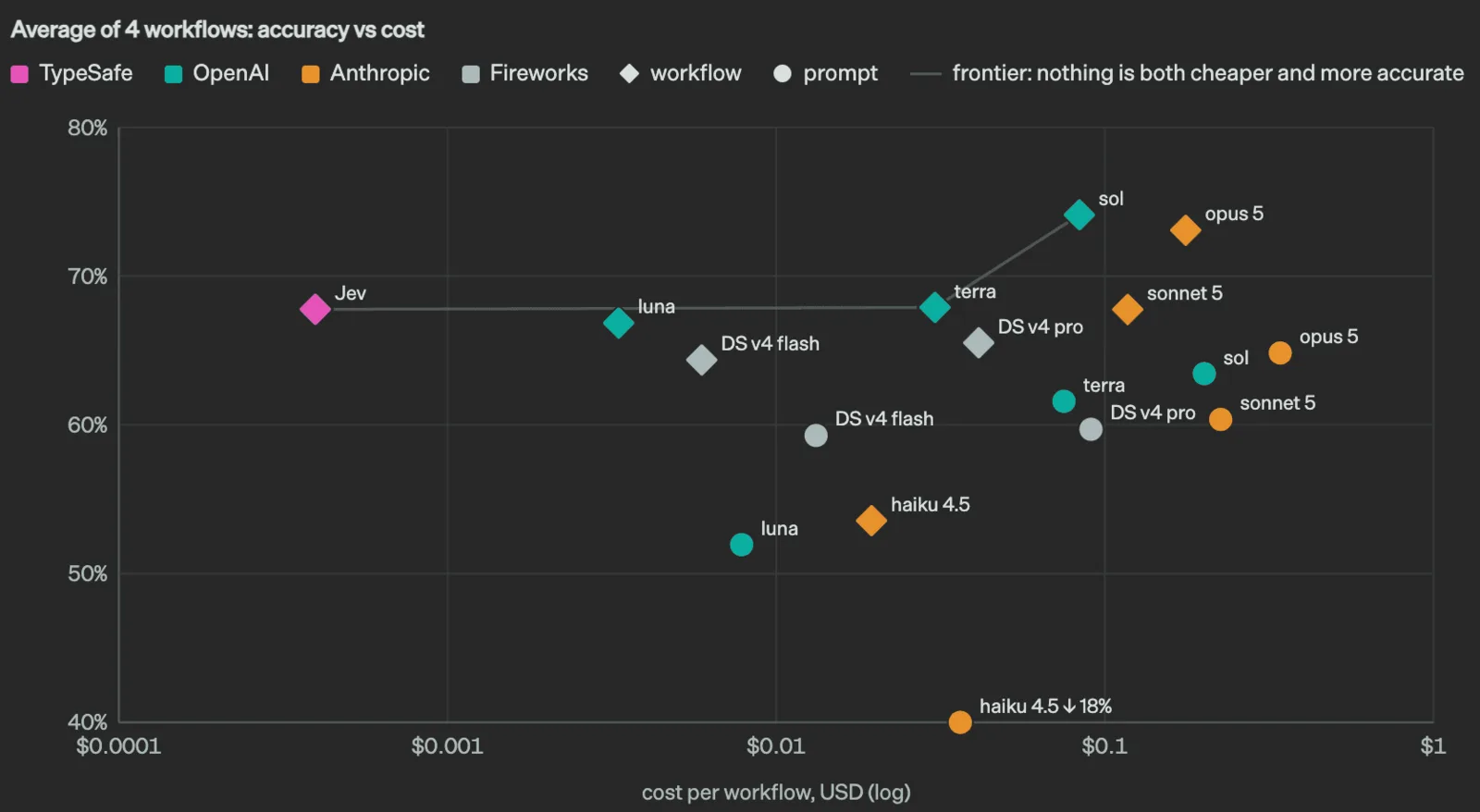
Accuracy against cost; the x axis is dollars per workflow on a log scale. Source: TypeSafe AI blog
This chart places Jev more honestly than any ratio does. Jev is not the most accurate model. Averaged over the four workflows it lands around 68%, about six points short of GPT-5.6 Sol at roughly 74%. Where Jev sits is the same accuracy band for two orders of magnitude less money: Luna reaches ~67% at ~$0.003 and Terra ~68% at ~$0.04, while Jev gets ~68% at ~$0.0004.
So the question is not whether Jev is smart. It is whether this particular workload is worth six accuracy points. If your design already routes the uncertain cases to a person, cheaper wins; if a single miss is expensive, staying on Sol is the safer call.
The order-of-magnitude gap is still hard to ignore. Classifying 100,000 tickets a day at 400 tokens each is 40 million input tokens: $1.68 per day on Jev, with output free. The same job on a model at $2.00 input / $12.00 output runs closer to $140 a day even at 50 output tokens per ticket.
Getting started: from the waitlist to your first request
-
Join the early access waitlist
Sign up at typesafe.ai. As of October 2026 the official site still describes Jev as in early access. In September TypeSafe said it is "bringing developers off the waitlist as quickly as we can," and hands-on reports describe an invitation arriving shortly after signing up.
-
Create an API key
Create an account at console.typesafe.ai and generate a key. It is shown exactly once — copy it then. The environment variable is
TYPESAFE_API_KEY. -
Feel it out in the Playground
The console Playground takes a state as plain text on the left and questions as JSON on the right, and shows measured latency. Working out your wording here, before you install anything, is the faster path.
-
Call it from the Python SDK
pip install typesafe-sdkfrom typesafe_sdk import Choice, Noul, Score, TypeSafeClient client = TypeSafeClient() ticket = "Hi, I've been trying to connect my Stripe account for 3 days and it keeps failing. I'm losing sales. Please help ASAP." response = client.system_one( state=ticket, questions={ "department": Choice( instructions="Which team should handle this", criteria={ "billing": "Payment or subscription issues", "technical": "Bugs or integration problems", "sales": "Pricing or account questions", }, ), "frustration": Score( instructions="How frustrated the customer appears", criteria=[ "Calm, just stating facts", "Frustrated but civil", "Very angry, strong language", ], ), "is_urgent": Noul( instructions="The message conveys urgency or time-sensitivity", ), }, ) print(response.answers["department"].choice) # "billing" print(response.answers["frustration"].score) # 1.035 print(response.answers["is_urgent"].noul) # 0.999For JavaScript/TypeScript:
npm install @typesafe-ai/sdk(Node.js 20+). Callingclient.systemOne()infers the return types from your question definitions. -
Or hit the HTTP API directly
POST https://api.typesafe.ai/v1/systemone, authenticating withAuthorization: Bearer <API_KEY>.{ "state": "Help! My payouts have been failing for 3 days.", "model": "jev-latest", "questions": { "is_urgent": { "type": "noul", "instructions": "Does this convey urgency?" }, "department": { "type": "choice", "instructions": "Which team should handle this?", "criteria": { "billing": "Payments, invoicing, refunds", "technical": "Bugs, outages, integrations", "sales": "Pricing, upgrades, new accounts" } } } }The response carries
usagewith both token counts, but only input tokens are billed.{ "model": "jev-latest", "answers": { "is_urgent": { "type": "noul", "noul": 0.92 }, "department": { "type": "choice", "choice": "technical", "probabilities": { "billing": 0.08, "technical": 0.85, "sales": 0.07 }, "confidence": 0.82 } }, "usage": { "input_tokens": 312, "output_tokens": 48 } } -
Use it from a coding agent
TypeSafe publishes an agent skill. For Claude Code it is two lines:
claude plugin marketplace add typesafe-ai/skills
claude plugin install typesafe@typesafe-ai
For other agents,
npx skills add typesafe-ai/skills --skill typesafe-ai. The skill loads the three question types and the architectural patterns, so the agent can find brittle parsing code in your repo and rewrite it. TypeSafe itself notes that "agents aren't great at writing questions, so expect to edit collaboratively with them." Question design stays a human job.
Confidence: catching "I'm not sure" and routing it to a person
Ask an LLM to report its own certainty and you get prose. Jev returns a confidence value between 0 and 1 computed from the probability distribution: peaked means high, spread means low. That makes "send only the uncertain ones to a human" straightforward to write.
The published starting points:
| Confidence | Treatment |
|---|---|
| Above 0.9 | Act automatically |
| 0.5–0.9 | Proceed carefully: confirm with the user or flag for review |
| Below 0.5 | Do not act. Route to a human or ask a clarifying question |
The real point is to scale the threshold with the consequence. There is no reason for "show balance" and "approve transfer" to share one.
if confidence < 0.5:
    route_to_human(user_message)
elif action.choice == "check_balance":
    show_balance(account_id)                 # low stakes: just do it
elif action.choice == "approve_transfer":
    if confidence > 0.9:
        confirm_then_execute(account_id)
    else:
        ask_user_to_confirm(account_id)      # high stakes: verify first
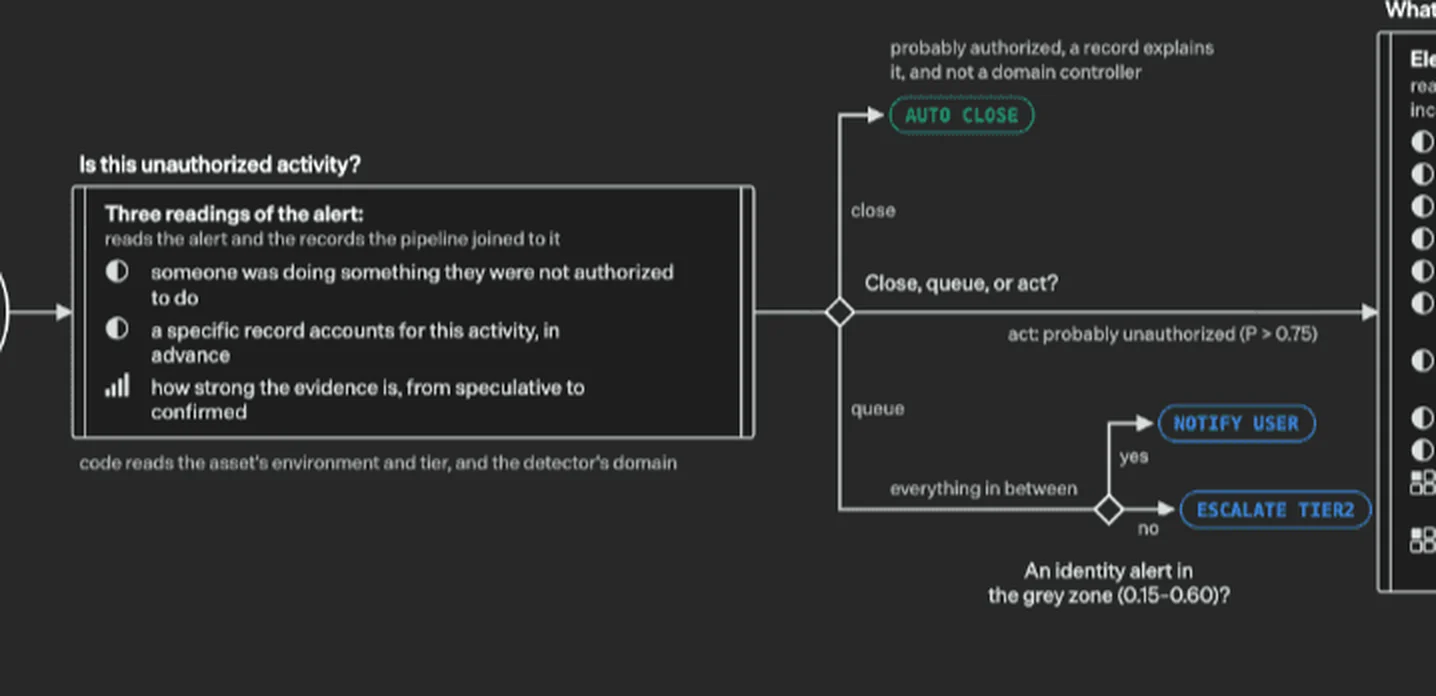
Part of the incident triage pipeline TypeSafe publishes. The probability thresholds (P > 0.75, 0.15–0.60) are the branch conditions themselves. Source: TypeSafe AI blog (excerpt)
The security-alert example TypeSafe publishes is the clearest implementation of this. One alert gets two Bool questions about whether the activity was authorised and one Score question about how strong the evidence is, and then: act above 0.75, auto-close below 0.15, and in between (0.15–0.60) either notify the user or escalate to Tier 2. The thresholds are the operating policy.
The docs add that these are a starting point only: "start with conservative thresholds, test with your own data, and adjust." One Qiita write-up also found that the confidence formula implied by the official examples is inconsistent — some match a rescaled-maximum formula, one matches an entropy-based one. Where a threshold really matters, compute it yourself from the returned probabilities.
Where it actually pays off
Drawing from the official cookbooks and the published deployments.
01Sorting what comes in
The most natural fit: the same judgement, repeated at volume.
- Support triage — department, urgency, churn risk and any commitment the customer made, in a single call
- Insurance claims — classify the report, detect complexity and fraud signals, set processing order
- Recruiting — score résumés against criteria and escalate only the uncertain ones
- Lead generation — ICP match, industry fit, purchase intent
02Wrapping an LLM
Sitting at the entrance and exit of a generative app. At a few hundred milliseconds it fits without the user noticing.
- Guardrails — jailbreaks, prompt injection and self-harm signals on the way in; policy violations and unsafe advice on the way out. The official cookbook shows two policies, "strict" and "permissive," with review at 0.35 and action at 0.70–0.85
- Citation checking — verify that each claim the LLM made is actually supported by the source
- Tool-call screening — decide whether the action an agent is about to take is dangerous, before it runs
03Sharpening search and RAG
Replacing "roughly nearby in embedding space" with an explicit judgement.
- Re-ranking — rescore search results; used in place of a cross-encoder
- RAG passage filtering — score whether retrieved text answers the question, and drop the noise before it reaches the LLM
- Line-by-line semantic search — judge a document line by line and surface only the hits
04Embedding it in code and workflows
The judgements that do not justify an LLM call but cannot be written as a regex.
- Semantic linting — enforce naming conventions and writing guidelines in CI
- Model routing — classify intent and difficulty, and send the easy requests to a cheaper model
- Function calling — map natural language onto typed functions
- Date and value extraction — staged extraction (the SDE cascade) for better precision
Real-time decisions: what the Doom demo shows
The official Doom demo passes a text representation of the game state — not images — and calls Jev about ten times a second to choose the next action, at roughly $7 an hour. Read it not as a gaming result but as a demonstration that an AI decision can sit inside a sub-150 ms loop. Embedded UI branching and in-game chat moderation belong in the same bucket.
What developers are trying
Qiita's campaign had 14 articles posted as of September. They fall into three groups.
- Batch judgements in Japanese — one author used an article outline as the state and asked 12 questions at once (8 Scores, 4 Choices): technical depth, practicality, beginner accessibility and so on. The publishing-platform choice came back Qiita 92% / Zenn 8% at 84% confidence; technical depth scored 1.97/2.00 at 96% confidence. The Playground reported 96 ms + 212 ms
- Can it replace LLM-based branching? — a study done without early access, working only from the SDK and public docs, that reverse-engineered the confidence formula and found an inconsistency: SDK 0.6.0's type validation rejects the official Quick Start example
- Comparison as an agent architecture — placing a setup where an LLM picks the next step (Amazon Bedrock AgentCore) beside one where Jev returns a classification and the program branches, framed as "who owns the decision about how the process proceeds — the program or the AI"
Abroad, Browserbase is using it for browser-agent decisions, and other developers for a live trading agent and for email triage at scale. None of these have published numbers.
Using it on non-English input
This is the part that matters most outside English-speaking markets. The state documentation says, in substance:
"Other languages, including CJK scripts, are accepted but currently have lower accuracy." English is Jev's first language, and English input is where it performs best.
In practice, Japanese hands-on reports show urgency judgements coming back at 0.97–0.98 — it works. But "it works" and "it is accurate enough to ship" are different claims. A realistic path:
- Write instructions and criteria in English — leave the state in its original language and give the model its directions in the language it is strongest in
- Measure once against labelled data — 100–300 past tickets with human labels, compared against Jev's output. That is where your threshold actually comes from
- Start with a high threshold and keep people in the loop — automate only above 0.9 at first, and raise coverage as you learn
Where it struggles: TypeSafe publishes its own weak spots
TypeSafe documents Jev 1.13's failure modes itself, on a page called model-jaggedness. Read it before you ship.
| Weakness | What actually happens |
|---|---|
| Reads literally | Scoping words, negations and implied conditions are taken at face value. It answers the question you wrote, not the one you meant |
| Cannot count | Characters, occurrences and list lengths are unreliable, and error grows with size |
| Weak numeric precision | Poor with hex values and RGB triples; cannot reliably judge whether two values are close |
| Weak on dates and times | Reads dates as text, not as ordered quantities. Ordering and duration maths are unreliable |
| Struggles with double negatives | Conflicts between instructions and criteria cause confusion |
| Degrades on bloated state | Accuracy falls as the state fills with content unrelated to the decision |
On top of that, mathematical relationships between related questions are not guaranteed. Ask "is A" and "is not A" as two separate Nouls and the probabilities will not necessarily sum to 1. If you need that consistency, collapse them into one Choice.
And one more: the docs state that Jev is vulnerable to adversarial content inside the state. If you feed user input straight in, prompt injection remains your problem to solve.
What to move to Jev, and what to leave alone
Jev does not replace a general-purpose LLM. It exists to move one slice of the work out of it.
 Jev | Typed judgements only, in 70–500 ms
A model narrowed to classification, scoring and truth values. It writes nothing. Use it where the options can be enumerated in advance and the same judgement repeats at volume. Its job ends at returning the value and its probability — what happens next is your application code's decision.
 Claude | Writing and long reasoning stay with the LLM
Summarising, drafting, code generation and multi-step reasoning are Claude's territory. Jev handles the guardrails around it and the verification after it — whether a citation really appears in the source. These are complements, not competitors: Jev sits thinly on either side of the LLM.
 ChatGPT | For classification alone, a small model is also an option
If all you need is classification or extraction, ChatGPT's API has cheap models too — GPT-5.6 Luna runs $0.20 per million input tokens. The gap to Jev is roughly 5x on price, plus output billing and the parsing step. If you are already on OpenAI, check whether the cheap model suffices before you compare.
 Dify | Move workflow branching conditions off the LLM
In workflow tools like Dify, conditional branches are often decided by an LLM node. That is exactly a decision whose options are known in advance, so moving it to Jev takes that step from seconds to milliseconds — which shows up in the latency of the whole flow.
 Claude Code | Find the judgement sites in your repo and rewrite them
With the official skill installed, Claude Code can hunt through a repository for brittle parsing and regexes straining to express a judgement, and convert them into Jev calls. Keep the questions and confidence thresholds in one file so they stay reviewable.
Frequently asked questions
QIs Jev free to use?
It is usage-based, but the console billing page shows $5/month of free usage (reported September 2026). At $0.042 per million input tokens, that allowance alone covers a great many calls. You need a waitlist invitation first.
QDoes it work in languages other than English?
Yes, but the docs state that CJK scripts are accepted with lower accuracy than English. Passing non-English state is fine and urgency judgements return usable values. Verify accuracy and thresholds on your own labelled data before shipping.
QCan it generate or summarise text?
No. TypeSafe states that Jev is "not trained to generate text," and that forcing generation through chaining performs poorly and slowly. Generation is the LLM's job.
QCan I send images or PDFs?
No. State is text only, in one of three shapes: string, JSON object, or array of strings. Run OCR or transcription first and pass the text.
QShould I choose Jev or Microsoft-Decision-1?
Pricing ($0.042 per million input tokens, free output) and question types are the same, so choose based on how each is offered. Choose Microsoft-Decision-1 (preview on Foundry, 32,768-token context) if you want contracts, billing and authentication in Azure. Choose Jev (early access, 64,000-token context) if you need long inputs or the official SDKs and agent skills. Because the request shapes are nearly identical, sending the same questions to both and comparing on your own data is the most reliable way to decide.
QWhat does "free output" mean?
Both models return only probabilities and values, not prose. The tokens for those answers are not charged, so your bill depends only on the input tokens (the text and questions you send). Jev's `usage` field records output tokens too, but only input is billed.
QDoes Microsoft-Decision-1 work in Japanese?
No list of supported languages has been published. Microsoft's announcement says only that the evaluation included multilingual tasks, with no Japanese accuracy figure. Jev, for its part, says CJK is less accurate than English. For either one, measure accuracy on your own labelled data before using it for Japanese work.
QAre the "200x faster, 400x cheaper" numbers real?
They are all TypeSafe's own measurements, from a self-designed "workflow evals" frame whose workloads are not published, with no third-party verification yet. The order of magnitude is clear from the price list; the ratio on your workload is yours to measure.
In summary
What Jev introduces is not new capability but a new division of labour. Take the part of the job where the options are known in advance, hand it to a specialised model that is orders of magnitude faster and cheaper, and leave generation and reasoning with the LLM.
To try it, pick one place in production where you currently send work to an LLM and parse JSON out of the response. That is Jev's territory. Run ten of those same inputs through the Playground and see whether the judgements agree — that alone tells you whether it can be swapped in.
Two things to settle before production: the confidence threshold (different per how consequential the action is), and who looks at everything below it. With those in place, a wrong judgement stays an inconvenience rather than an incident.
Information in this article reflects what TypeSafe AI published on its site, documentation and blog as of 19 September 2026 (with the Microsoft-Decision-1 section and Jev's latest status added on 13 October 2026, based on TypeSafe AI's and Microsoft's official sites, documentation and blogs), plus publicly available hands-on reports. Jev is in early access; specifications, pricing and rate limits may change. Check the official site for the current details.
AI tools featured in this article

Related articles
Claude Fable 5 vs. GPT-5.5 vs. Gemini 3.1 Pro: Which Should You Choose? A Deep Dive into Performance, Pricing, and Use Cases [July 2026]
A thorough comparison of the latest flagship models from the industry's three leading AI labs, all released in the first half of 2026: Claude Fable 5, GPT-5.5, and Gemini 3.1 Pro. Covers benchmark performance, API pricing, context windows, multimodal support, and how to use them on consumer plans like ChatGPT Plus, Claude Pro, and Google AI Pro — with recommendations by use case, based primarily on official data.
![Claude Fable 5 vs. GPT-5.5 vs. Gemini 3.1 Pro: Which Should You Choose? A Deep Dive into Performance, Pricing, and Use Cases [July 2026]](/_next/image?url=%2Fimages%2Farticles%2Fai-model-compare-claude-fable-5-gpt-5-5-gemini-3-1.png&w=3840&q=75 "Claude Fable 5 vs. GPT-5.5 vs. Gemini 3.1 Pro: Which Should You Choose? A Deep Dive into Performance, Pricing, and Use Cases [July 2026]")
What GPT-6 Astra Is [September 2026]: Which ChatGPT Plans Include It, API Pricing, and How to Split Work with GPT-5.6
GPT-6 Astra, announced by OpenAI on 3 September 2026 (US time), is a flagship tuned for computer use and long, multi-step work, true to the pitch that it "can do anything a person can do on a computer." It scores 72.6% on OSWorld 2.0, and time per task drops 47% from GPT-5.6 Sol's roughly 75 minutes to roughly 40. This article checks what changed against the benchmarks, then lays out where each ChatGPT plan can use it (Pro at ¥16,800 / ¥30,000, Business and Enterprise get "GPT-6 Pro" in Chat; Plus at ¥3,000 gets it through ChatGPT Work and Codex; Free and Go do not), the caps such as 50 or 200 messages a week, API pricing ($10 input / $50 output, 2.5x Sol) and how to split work with Sol, Terra and Luna, and the behaviour changes on switching (more clarifying questions, more sensitivity to skill files), based on OpenAI's announcement, Help Center and model page.
![What GPT-6 Astra Is [September 2026]: Which ChatGPT Plans Include It, API Pricing, and How to Split Work with GPT-5.6](/_next/image?url=%2Fimages%2Farticles%2Fgpt-6-astra-guide.png&w=3840&q=75 "What GPT-6 Astra Is [September 2026]: Which ChatGPT Plans Include It, API Pricing, and How to Split Work with GPT-5.6")
What Is Cloudflare OS? A Deep Dive into the Open-Source AI Agent Workspace (Architecture, Gatekeepers, Self-Hosting, Pricing)
Cloudflare open-sourced Cloudflare OS, an AI agent workspace, on August 5, 2026. This article covers its zero-permission Gatekeeper security, model selection and cost control via AI Gateway, Gadgets (small personal apps), how to deploy it into your own Cloudflare account, and pricing — based on the official blog and GitHub.

How to Use Sakana AI Fugu: From API Key to Claude Code | Pricing, Free Tier, and Performance
A guide to Sakana AI's multi-agent platform Fugu: issuing an API key at console.sakana.ai, calling the OpenAI-compatible API, and wiring it into Codex and Claude Code. Covers choosing between Fugu, Fugu Ultra, and Fugu Cyber, pricing and whether a free tier exists, and benchmark performance.