Robylon
: How to use it, features, and the business problems it solves
Add bookmark
What is Robylon?
A customer support AI agent from Zooid Tech Inc. in San Francisco, USA. It answers inquiries by email, chat, voice calls, WhatsApp and more, connects with Zendesk, Freshdesk, Salesforce, Shopify and others to carry out refunds, order updates and ticket handling, and hands anything it cannot resolve to a person with the conversation attached. The AI answers in 40+ languages, including Japanese. Pricing is by AI credits rather than seats: free Starter (300 credits, about 40 conversations, a month), Pro from $25/month, Business from $180/month, and Enterprise by quote. Used by 250+ companies; SOC 2 Type II and HIPAA compliant.
Business problems it solves


About "Robylon"
What is Robylon?
Robylon is an AI agent platform for customer support from Zooid Tech Inc. in San Francisco, USA. Beyond answering inquiries that arrive by email, web chat, voice calls, WhatsApp and more, its AI reads internal systems such as orders, accounts and bookings, and carries out the work itself: refunds, order updates, ticket handling and so on. Inquiries the AI cannot finish are handed to a person with the conversation history and a summary attached.
It can run inside an existing helpdesk such as Zendesk, Freshdesk, Zoho Desk, Salesforce or Intercom, or on its own with Robylon's inbox and seats for human agents. According to the company, more than 250 businesses use it across e-commerce, fintech, SaaS, logistics, gaming and health.
per the official site
300 credits/month (~40 conversations)
Japanese included
per the company
How to use it
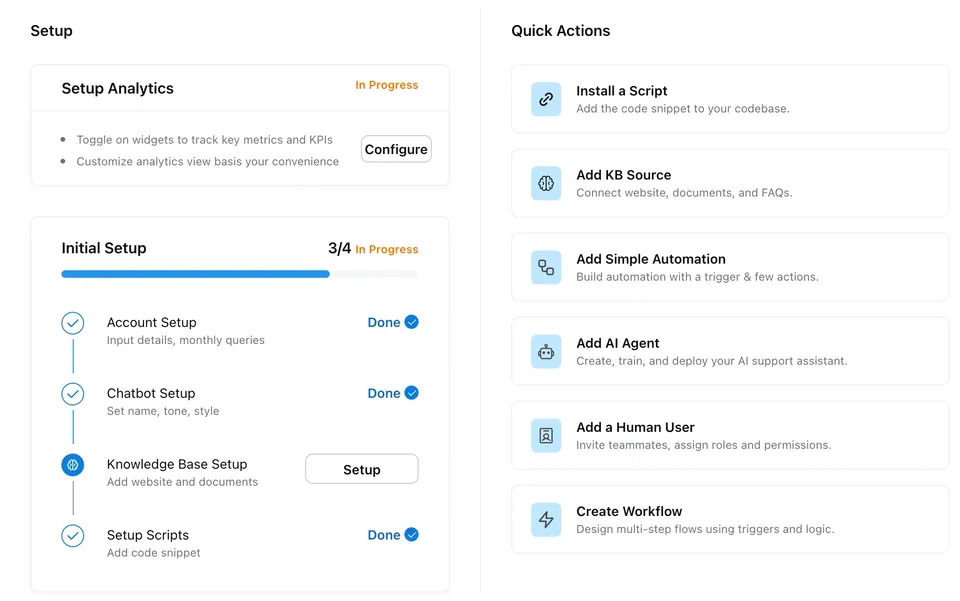
Following the setup checklist on the dashboard's Home page takes a new workspace from empty to live (per the Quick Start in the official docs).
-
Sign up on the free Starter plan
Register from "Get Started for Free" on the official site. Starter is free and includes 300 credits a month (about 40 conversations) and web chat, which is enough to trial it on real data.
-
Set company details and languages
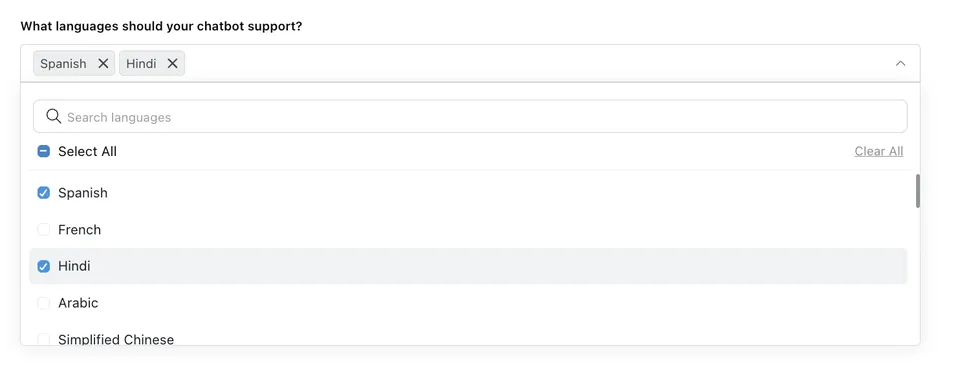
Enter your company details in "Account Setup", then choose the AI's default language and the other languages it should support under "Languages". Japanese is one of the options.
-
Add your knowledge
Add your website, help center, FAQs, Word documents, Google Drive documents and Q&As typed straight in as "knowledge sources". The AI answers from these and cites them.
-
Install the chat widget
Set the widget's name, icon and look, then paste the generated script into your site. The docs also cover WordPress, Wix, Webflow, Framer, Bubble and mobile apps.
-
Test before launch, then add channels and people
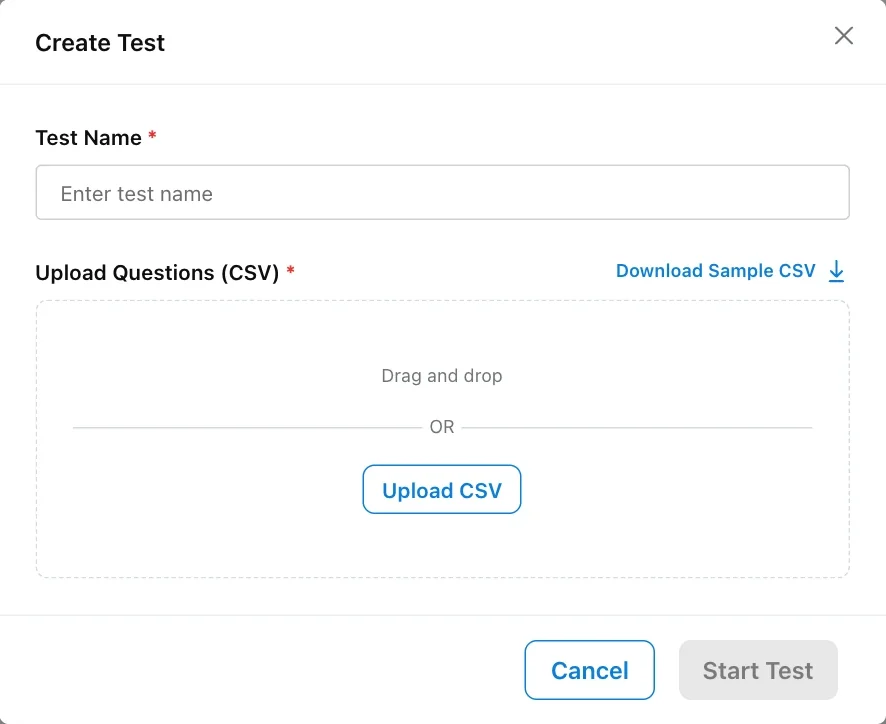
Run a bulk test with a CSV of expected questions to check the answers before going live. After that, add channels such as email, WhatsApp and voice, and invite your human agents.
The dashboard's Home page shows a four-step checklist (Account Setup, Chatbot Setup, Knowledge Base Setup, Setup Scripts) alongside shortcuts to install the script, add knowledge sources, create an AI agent, build a workflow and more.
Features
01Answer the inquiry and finish the job
It is not a chatbot that stops at FAQs; it reads and acts on your internal systems.
- Knowledge agents — search the registered knowledge, answer and show the basis
- Tool-enabled actions — book and reschedule, update CRM fields, send payment links, create tickets and more through your APIs and connected apps
- Workflows — decide what happens next with triggers, conditions and fallbacks
- Human handoff — pass the case to a person with the history, a summary and recommended next steps
02One agent across every channel
The same knowledge, the same actions and the same analytics are shared across channels.
- Channels — email, web and in-app chat, voice calls, WhatsApp, Instagram, Facebook, SMS through Twilio, YouTube comments and app-store reviews
- Works inside your helpdesk — Freshdesk, Zendesk, Zoho Desk, Salesforce, Vtiger, Intercom, Freshchat, SalesIQ and Gorgias
- Integrations — 38 helpdesk, CRM, e-commerce (Shopify, WooCommerce, etc.) and telephony (Twilio, Amazon Connect, Aircall, etc.) tools, plus anything with a REST API
03Improve quality after launch
It comes with the tools to keep fixing answers while it runs.
- Bulk testing — upload a CSV of expected questions and grade the AI's answers and sources together
- KB gaps — find the questions it is failing to answer (Pro and above)
- Q&As from human agents — extract questions and answers from chats your team closed and add them to the knowledge after review
- Analytics and conversation review — track deflection, handling time, CSAT and more, and trace which knowledge and tools the AI used
04Choose the AI model
For each agent you can choose a model from Google Gemini, OpenAI GPT, Anthropic Claude, and DeepSeek, Kimi and GLM hosted on Azure, among others. Starter has the basic models, Pro and above have all of them, and Enterprise can bring its own LLM.
For the pre-launch bulk test, list questions close to real inquiries in a CSV "Question" column and upload it; the AI answers each one with its live settings. You check each answer and the sources it used, grade them and export the results. There is no fixed limit on the number of questions.
Pricing
Workspace pricing is set by monthly AI credits, not seats. Estimates assume about 7.5 credits per conversation, and the conversation counts below are for chat, WhatsApp and email (voice calls use credits at a different rate). Prices are in US dollars, as checked on the official pricing page in October 2026.
| Plan | Monthly billing | Yearly billing (per month) | Monthly credits (approx. conversations) | Main contents |
|---|---|---|---|---|
| Starter | $0 | $0 | 300 (~40) | Web chat, 50 knowledge sources / 1 MB, basic models, Slack, basic analytics |
| Pro | $25–$158 | $22–$142 | 500–3,500 (~67–467) | WhatsApp, email and ticketing, all models, LLM fallback, KB gaps and testing, MS Teams and Google Sheets |
| Business | $180–$300 | $162–$270 | 4,500–10,000 (~600–1,333) | Voice calls, Freshdesk/Zendesk/Zoho Desk integrations, custom API integrations, chat and voice analytics, AI insights |
| Enterprise | Contact sales | Contact sales | Custom | Bring your own LLM, WhatsApp voice calls, SSO, audit logs, custom data retention, SLAs, dedicated account manager |
Pro and Business prices change with the credit tier (monthly billing). Pro: 500 = $25 / 1,500 = $75 / 2,500 = $113 / 3,500 = $158. Business: 4,500 = $180 / 6,000 = $240 / 8,000 = $280 / 10,000 = $300.
Can it answer inquiries in Japanese?
The official site and dashboard guidance are in English. The languages the AI answers in, however, are chosen in the "Languages" setting, and the list in the official docs includes Japanese. Once you pick a default language and supported languages, it detects the customer's language on every turn and replies in it, falling back to the default when it cannot tell. There is also a setting that lets agents write in their own language and have the reply translated into the customer's language.
Supported languages are picked from a searchable list. The docs advise choosing only languages your knowledge base and team can back up, so running it in Japanese assumes you have Japanese knowledge sources. Voice agents choose their language separately, through their speech-to-text and text-to-speech settings.
Track record and reputation
The official site names customers including HealthifyMe, Tata MD, Bewakoof.com, Fyers, Mudrex, HT Media Group, Aditya Birla Fashion & Retail and Topmate. Results from its published customer stories are below (all as stated on the official customer story pages).
01Automatic resolution
- 95%+ — knowledge-base queries resolved automatically at a gaming company
- ~85% — chat queries resolved automatically at a D2C fashion brand (60% of tickets)
- 80%+ — tickets resolved automatically at an online trading platform
- 95%+ — improvement in average handling time at a US logistics enterprise
02Revenue and collections
- 40% — growth in conversions at HealthifyMe, with customer engagement doubled
- ~25% — more collections at a lending company with AI voice agents
- ~35% — lower lead qualification costs at an auto loan company with AI voice agents
"We are a platform for connecting Mentors and Students. Robylon's AI handles our unique use cases like canceling calls, refunds, processing payments, checking coupon validity, arranging meetings and more. Very happy!" — Ankit Agrawal, Co-founder at Topmate (quoted on the official pricing page)
On the review site G2, it is listed at 5.0 out of 5 from 42 reviews (as read by the company in October 2026).
Security and data handling
According to the company, Robylon is SOC 2 Type II and HIPAA compliant and aligned to GDPR and CPRA. Integrations use scoped credentials that you issue and can revoke at any time, so the AI reaches only the data and actions you grant. US data residency is available. In the dashboard you can mask 27 kinds of personal information, such as addresses, phone numbers and card numbers, by role. Reports and policies are published in the Trust Centre.
The company behind it
It is run by Zooid Tech Inc. (incorporated in California, headquartered in San Francisco), with Robylon as its brand. Co-founder Dinesh Goel is CEO and co-founder Mayank Shekhar is CTO.
How it differs from other customer support AI
What sets Robylon apart is that it starts free and bills by credits rather than seats, while one agent covers email, chat, voice and WhatsApp and carries out actions such as refunds and order updates.
| Aspect | Robylon | Intercom Fin AI | Chatbase |
|---|---|---|---|
| Billing unit | Monthly credits (Pro from $25/month) | Per resolution (from $0.99) | Monthly messages (Hobby from $32/month, billed yearly) |
| Free use | Starter (300 credits/month) | 14-day free trial | Free plan (50 messages/month) |
| Channels | Email, chat, voice, WhatsApp and more | Chat, email, phone, WhatsApp, SMS and more | Chat, email, voice |
| Relation to your helpdesk | Works inside Zendesk, Freshdesk, Zoho Desk and others, or standalone | Adds onto any helpdesk, or all-in-one with Intercom | Has its own helpdesk features |
The other products' columns reflect what is on each product page as of when it was checked.
If you want to pay per resolution, compare Intercom Fin AI; to build a bot from your own data without code, Chatbase. If you want a Japanese-made platform specialized in Japanese inquiries, KARAKURI and Chat Plus are also candidates. Robylon fits when you want to automate multi-channel inquiries, including the actions behind them, starting from a small budget.
FAQ
Can I use Robylon for free?
Yes. The Starter plan is free and includes 300 credits a month (about 40 conversations), web chat and up to 50 knowledge sources. WhatsApp and email need Pro or above, and voice calls need Business or above.
Can it answer inquiries in Japanese?
Japanese is in the list of languages the AI can answer in, and you can set it to reply in Japanese when a customer writes in Japanese. The official site and docs, however, are in English.
Are live agent seats required?
No. You can use AI agents only, and on Business and above the agent hands what it cannot resolve to Freshdesk, Zendesk or Zoho Desk. You buy seats at $19 to $89 each only if people answer inside Robylon's inbox.
What happens when I run out of credits?
AI replies pause and the live agent inbox keeps working. Move to a higher credit tier or buy 1,000 credits for $25.
The information on this page is based on what was published on the official website as of October 2026. Please check the official website for the latest specifications and pricing.