
Helpfeel
: How to use it, features, and the business problems it solves
Add bookmark
What is Helpfeel?
An AI knowledge search system from Helpfeel Inc., built around the patented “intent prediction search” technology. Its defining strength is landing users on the right FAQ article even from vague phrasing, spelling variants, or typos — the company reports a 98% search hit rate. Alongside search-type FAQ, it offers an AI agent that searches across internal PDFs and Word files to answer, an inquiry form that shows answers before submission, and analysis of accumulated inquiry data (VoC) with article improvement proposals, all on one platform. Deployed on 900+ sites as of January 2026, with a reported 70% reduction in inquiries and a 99% retention rate. Pricing is a package of an initial fee plus a monthly fee, quoted individually.
Business problems it solves




About "Helpfeel"
What is Helpfeel
Helpfeel is an AI knowledge search system from Helpfeel Inc. It improves the searchability of FAQ and help pages so that users solve problems on their own, cutting the volume of inquiries that reach the support team in the first place.
Source: Helpfeel official site (all screenshots below are from the same source)
Patented "intent prediction search"
As of January 2026
Reported result
When an FAQ site fails to reduce inquiries, the cause is usually not missing articles but the fact that users cannot reach the articles that already exist. People do not know the official terminology a company uses internally, so they type "I want to stop it" instead of "cancel", or "I want to send it back" instead of "return". Conventional full-text search returns zero results when the wording does not match, and the user gives up and reaches for the phone or email instead.
Helpfeel is built around that single problem: land the user on an existing article no matter how the question is phrased. The patented technology behind this is "intent prediction search", and the official site reports a search hit rate of 98%.
Type three characters and the right question appears
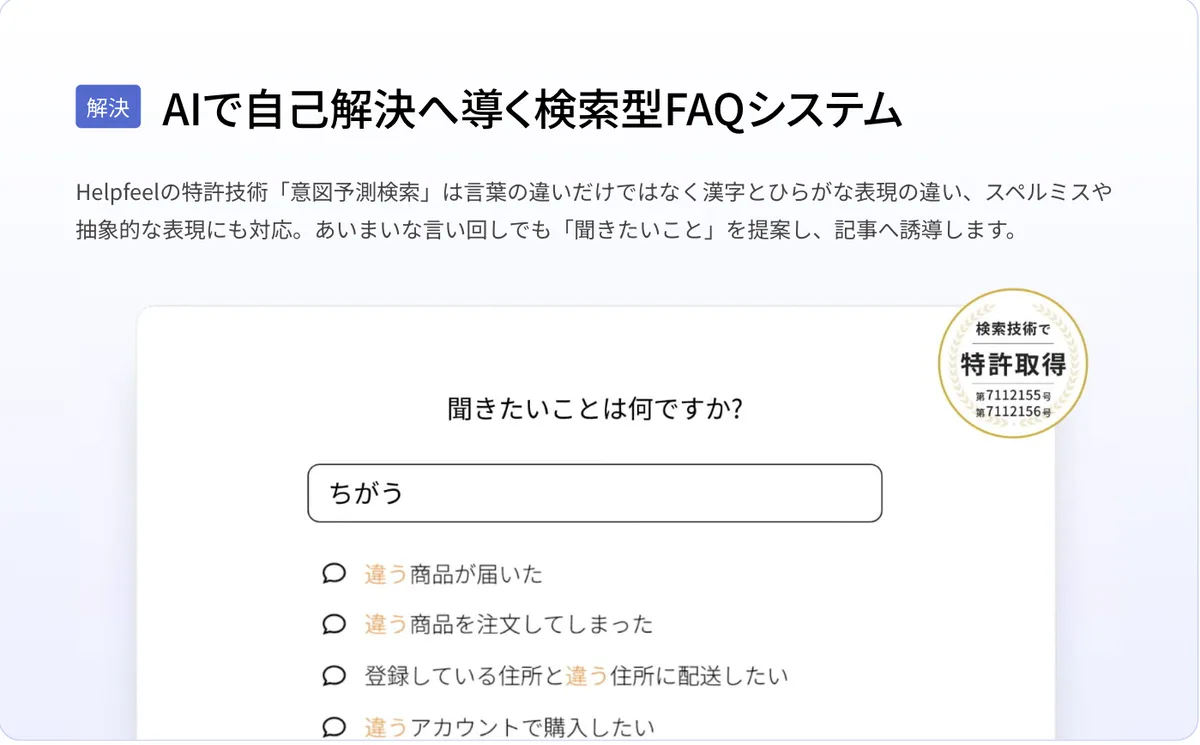
Intent prediction search works by expanding a large set of possible phrasings for each article in advance and offering candidates while the user is still typing. It handles variations between kanji and hiragana, spelling mistakes, and vague expressions.
In the screen on the right, typing just the three characters "ちがう" (chigau, "different/wrong") surfaces candidate questions such as "The wrong product arrived", "I ordered the wrong product", and "I want it delivered to an address different from the one registered". The user never has to come up with the correct term — they simply pick the option closest to their situation and land on the article.
The search technology is registered under Japanese patents No. 7112155 and No. 7112156.
The source of every answer stays visible
The scariest failure mode of a generative-AI chatbot is a plausible-sounding mistake. When the answer text is composed on the spot, there is no way to identify what caused the error — and therefore no way to fix it.
Helpfeel does not generate answers; it is built around landing the user on an existing FAQ article. In day-to-day operation, that difference is decisive.
Generating the answer
- Composes the reply on the spot
- The source cannot be identified
- No way to notice a mistake
- No way to know what to fix
Helpfeel (landing on an article)
- Directs the user to an existing article
- The source remains as an article
- Mistakes are visible in the article
- Fixing the article fixes the answer
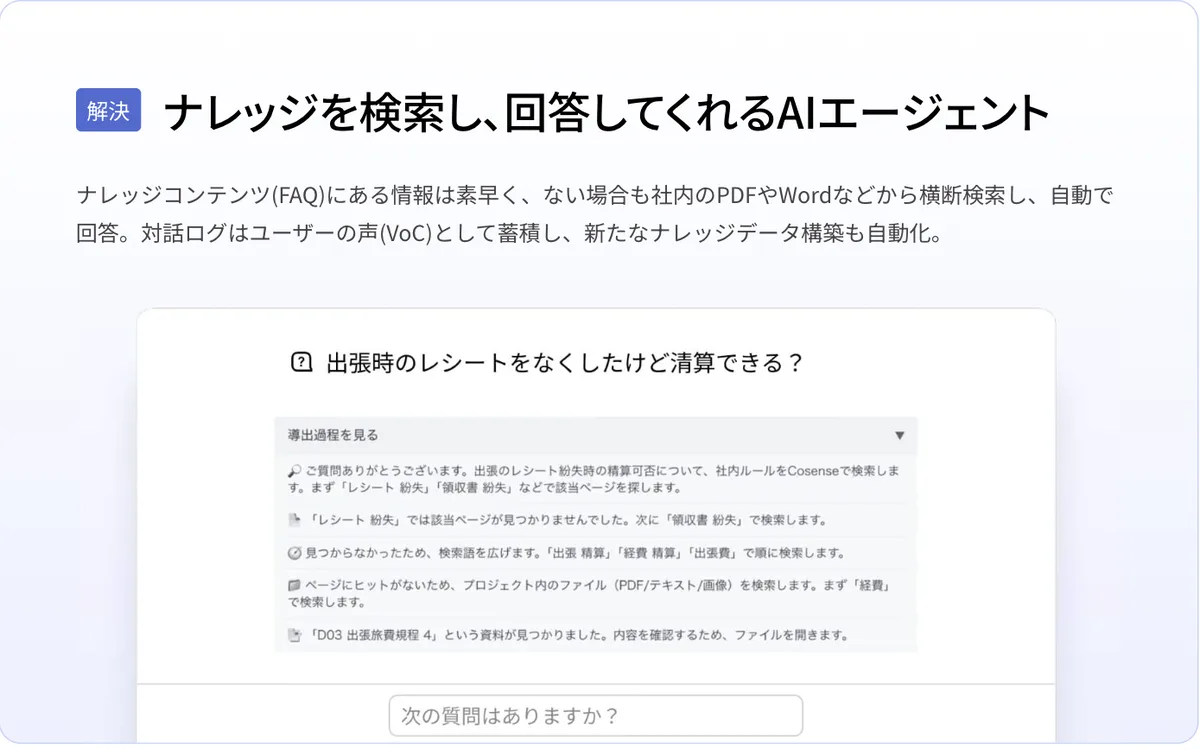
This traceability is a large part of why Helpfeel has been adopted in finance, public services, and infrastructure, where a wrong answer can become an incident. When the FAQ genuinely lacks the information, Helpfeel Agent Mode searches internal PDFs and Word files to assemble an answer — and even then, the reasoning trail showing how it searched and what it relied on can be opened and checked.
Place it wherever users get stuck
Helpfeel is not just a search box. It provides an entry point for self-service at each place where a question arises.
Helpfeel Agent Mode is a conversational AI agent. It answers quickly when the information exists in an FAQ article, and when it does not, it searches across internal PDFs, Word files, and similar documents to assemble an answer. The reasoning trail — how it searched and what it based the answer on — can be expanded, and conversation logs accumulate automatically as VoC (voice of the customer).
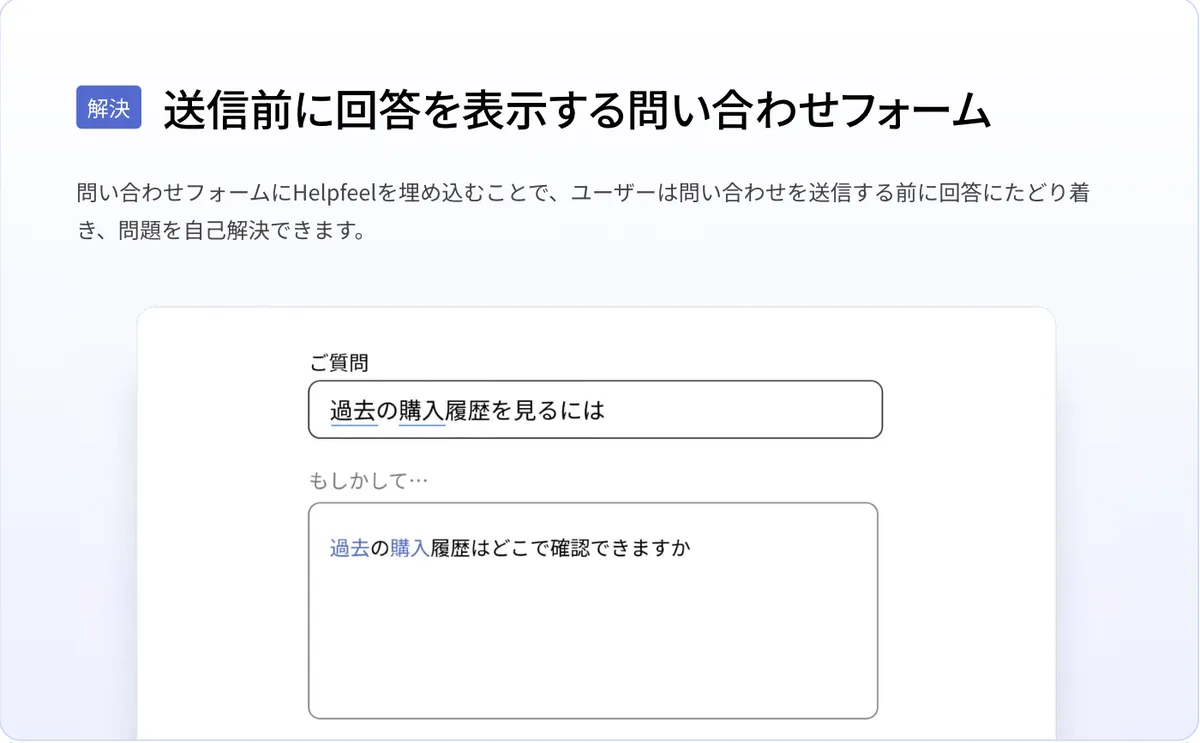
The inquiry form feature embeds Helpfeel inside the contact form itself. While the user is still typing their question, it offers "Did you mean…" candidates so they resolve the issue before submitting. This is the flow that most directly reduces inquiry volume.
Alongside these, a pop-up feature surfaces related FAQs from within a page, and Helpfeel Call / Voice Agent extends coverage to phone support.
Don't stop at publishing the article
The part of FAQ operations that most often stalls is improvement after launch. Because there is no visibility into which questions are going unresolved, adding and updating articles becomes guesswork.
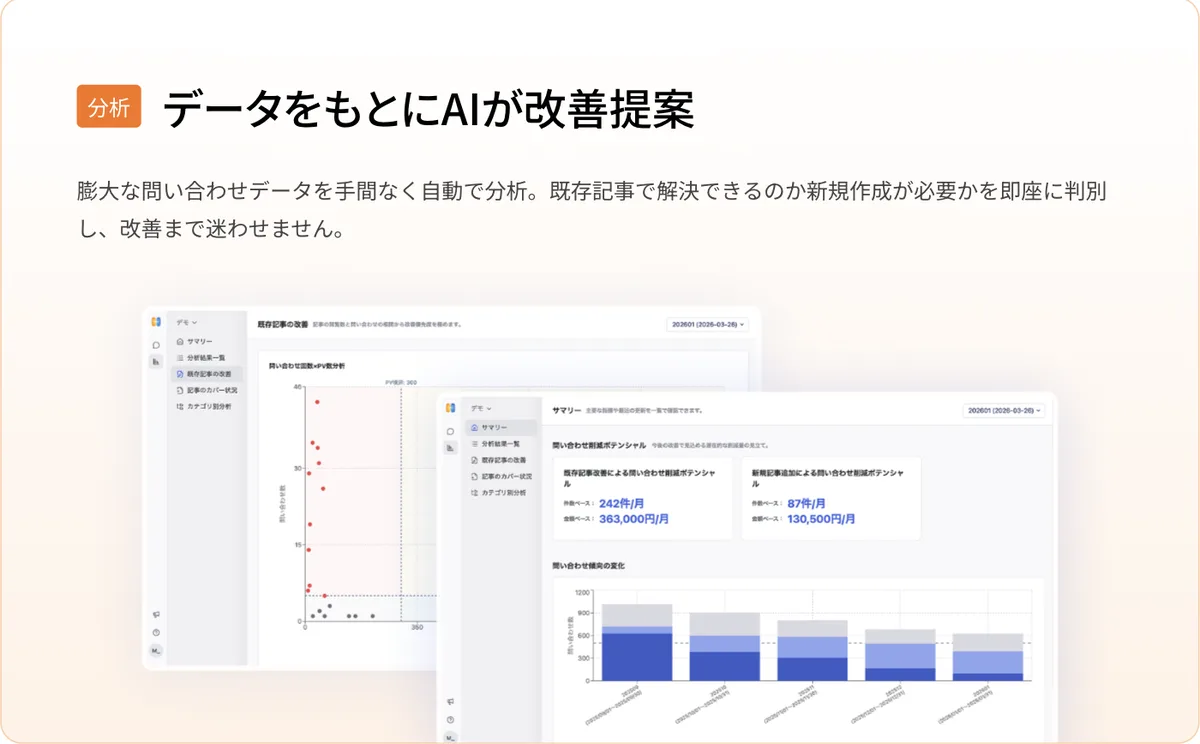
Helpfeel accumulates search keywords and conversation logs as intent data and analyses them automatically through Helpfeel Analytics and VoC / VoE analysis. It determines whether improving an existing article is enough or a new one is required, and goes as far as estimating the inquiry-reduction potential in both ticket counts and monetary value.
An article draft generation feature is included in the base fee, so gaps found through analysis flow straight into new articles.
This is why Helpfeel positions itself as a "knowledge data platform" rather than an FAQ system: the accumulated inquiry data is meant to be used beyond customer support, in marketing, product development, and corporate planning.
How to get started
-
Consultation and quote
Submit an inquiry or demo request from the official site. A free 30-minute consultation is offered, and a quote is prepared based on the size of your site and your intended use.
-
Migrating existing content and building the pages
Existing FAQ and help articles are migrated and the overall page structure is built. This is included in the initial fee and carried out by Helpfeel's specialist team — you do not need to rewrite your articles yourself.
-
Tuning search performance
Possible phrasings are expanded for each article so that searches hit. This step determines the accuracy of intent prediction search and is likewise included in the initial fee.
-
Launch and start measuring
Once live, access analytics begin collecting search keywords and resolution status. Implementation typically takes one to two months.
-
Iterate through monthly reviews
Monthly reports, funnel improvement proposals, and KPI design are included in the monthly fee. A dedicated support team works alongside you to add and improve articles based on the analysis.
Features
There are many features, but they fall into three roles. The platform is designed to run one loop: let users solve it themselves, analyse the result, then add articles based on that analysis.
01Guide users to solve it themselves
An entry point to the answer is placed at every touchpoint where a question arises.
- AI-FAQ — the patented "intent prediction search". Handles spelling variants, typos, and vague expressions, offering candidates as the user types
- Helpfeel Agent Mode — conversational AI agent. When the FAQ lacks the information, it searches internal PDFs and Word files and answers with a reasoning trail
- Inquiry form feature — embedded in the form, suggesting answers before submission (option)
- Pop-up feature — surfaces related FAQs from within a page (option)
- Helpfeel Call / Voice Agent — coverage for phone and voice channels
02Analyse the result and decide what is next
Makes visible which questions are going unresolved, and ranks what to improve first.
- Helpfeel Analytics — collection and analysis of intent data (search intent) and user journeys
- VoC / VoE analysis — distinguishes whether to improve an existing article or create a new one, estimating reduction potential in cases and monetary value (option)
- Access analytics and monthly reports — included in the base fee, with KPI design and funnel improvement proposals
03Create and extend the articles
Covers the work of turning the gaps found through analysis into published articles.
- Article draft generation — AI-generated drafts for new articles
- Content migration and page construction — included in the initial fee and performed by a specialist team
- Automatic translation — supports 50+ languages (option)
- AI-powered ticket management — announced as coming soon
Pricing
Helpfeel is priced as a package of an initial fee plus a monthly fee, and the amounts are not published. The official FAQ states that pricing "varies depending on your usage and the volume of article pages created", so every deal is individually quoted.
| Category | What is included |
|---|---|
| Initial fee (base) | Page construction / content migration / search performance tuning / mobile device support / article draft generation |
| Monthly fee (base) | System usage / access analytics / monthly reports / funnel improvement proposals / KPI design |
| Options | Pop-up feature / inquiry form feature / automatic translation / next-generation AI chat / VoC & VoE analysis |
As of August 2026, no pricing is published on the official site. Please request a quote for actual costs.
Customers and results
Deployed on more than 900 sites (as of January 2026). Reading the results published on the official site, the impact falls into three broad patterns. Which one your own support desk resembles determines the shape of the result you can expect.
01Inquiries stopped being raised at all
Users reach the answer themselves, so the inquiry never happens. This is the most commonly reported pattern.
- 70% fewer — Ryohin Keikaku (MUJI) / peak-season inquiries
- 61% fewer — Alpen Group
- 50% fewer — Traders (Min-na no FX), with phone handling also cut by 5 hours
- 30% fewer — Noritz / inquiries via the web
- ~20% fewer — Tohoku Electric Power / incoming calls
02Less agent time spent on handling
Not just the volume, but the share of contacts that need a human falls. This feeds straight into staffing plans.
- 8,500 hours a year — Life Card / handling time saved
- 90% fewer — Kirin Beer / agent-handled contacts
- 80% fewer — Hamee / cancellation handling
03Sustaining support at scale
Here the result is the sheer scale being supported rather than a reduction rate — cases where the user base or branch count is large and keeping answers consistent is itself the problem.
- 16 million accounts — Rakuten Bank / consumer support
- 150 branches — Hokuriku Bank / knowledge sharing across branches
- 7,000 calls — City of Nagoya / calls deflected
LUSH publishes a result of a different kind again: within four months of launch, inquiries fell roughly 10% while gift-wrapping sales rose 1.2x. Overall the case studies skew toward enterprise and public-sector organisations — bodies that handle high inquiry volumes and cannot afford incorrect answers.
How it differs from other AI chatbots and FAQ systems
| Aspect | Helpfeel | Generative AI chatbots in general | Traditional FAQ systems |
|---|---|---|---|
| How answers are produced | Lands users on existing FAQ articles (intent prediction search) plus cross-document search by an AI agent | The LLM generates each answer on the spot | Keyword full-text search |
| Phrasing variants and vague terms | Handled by expanding many possible phrasings in advance | Generally handled through context understanding | Often returns zero results when wording differs |
| Risk of wrong answers | Traceable, since answers map to articles | Hallucination remains possible | Low, but users often fail to find anything |
| Initial build | Article migration and search tuning performed by the vendor | You prepare the knowledge yourself | You register the articles yourself |
| Ongoing improvement | Monthly reports and improvement proposals included in the base fee | You analyse it yourself | You analyse it yourself |
| Price bracket | Initial fee + monthly fee package (individually quoted) | Often self-serve from a few thousand yen per month | Varies by product |
In the same space, Kasanare is a Japanese RAG agent built for specific business domains. Among overseas products, Intercom Fin AI tackles similar problems through generative AI auto-responses, while Mieruka Engine is the comparison point for analysing inquiry data.
This page is based on information published on the official site as of August 2026. Please check the official site for the latest specifications and pricing.